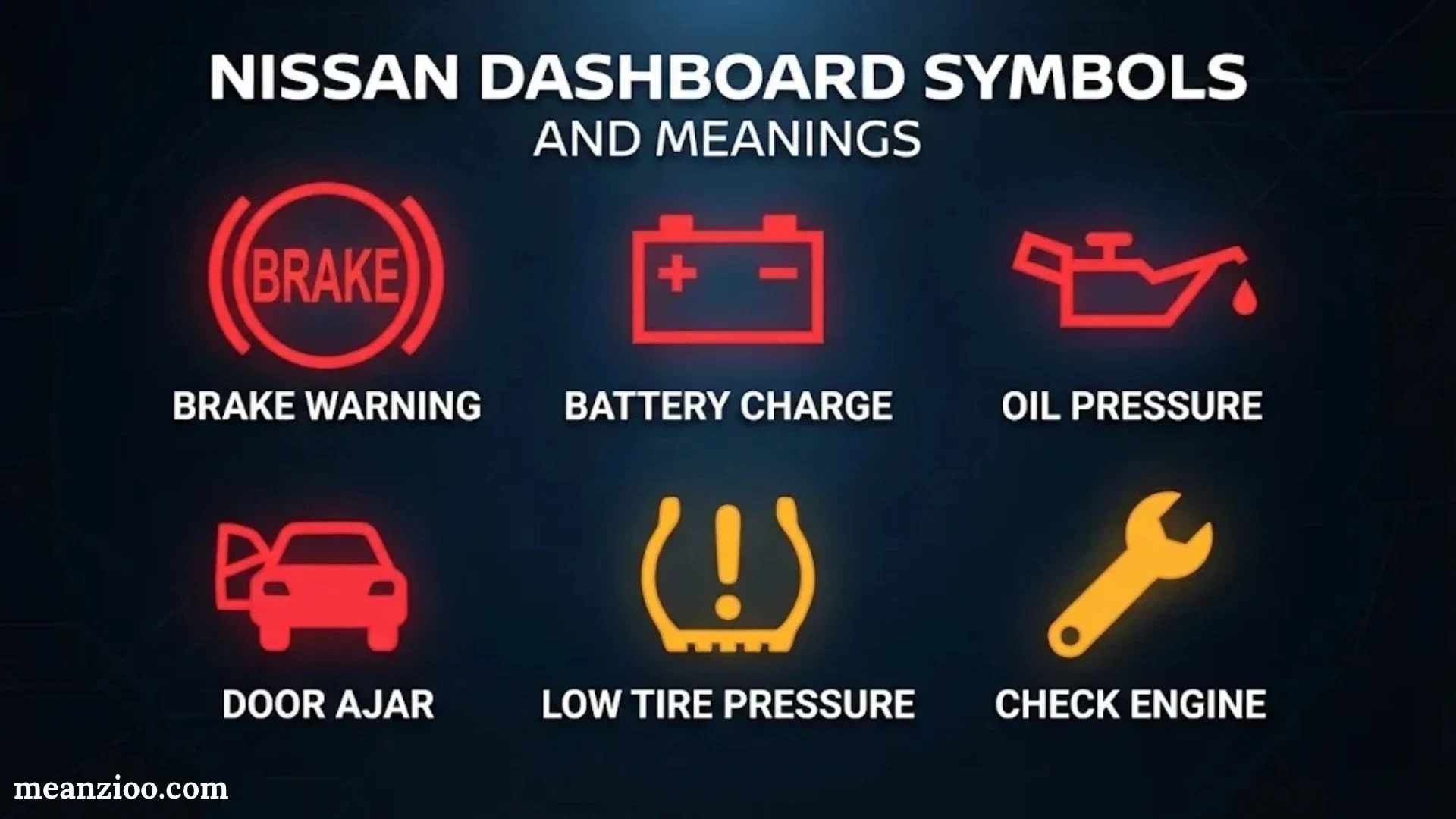
Your Nissan’s dashboard communicates important information every time you drive. Some lights confirm that a feature is working normally. Others warn you about problems that could affect your safety, engine performance, or vehicle reliability.
Understanding Nissan dashboard symbols and meanings helps you recognize potential problems before they become expensive repairs. A red brake warning light, flashing check engine light, or engine temperature warning shouldn’t be ignored. Meanwhile, green turn signals and blue high-beam indicators usually show that a feature is active.
However, not every dashboard light means the same thing across Nissan models. The Nissan Altima, Rogue, Sentra, Pathfinder, Frontier, and LEAF may display different symbols depending on their model year, trim level, and equipment.
This guide explains the most common Nissan dashboard warning lights, what they mean, why they appear, and what you should do when they illuminate. You’ll also learn which warnings require immediate attention and which ones generally allow you to drive cautiously to a repair facility.
What Do Nissan Dashboard Symbols and Warning Lights Mean?
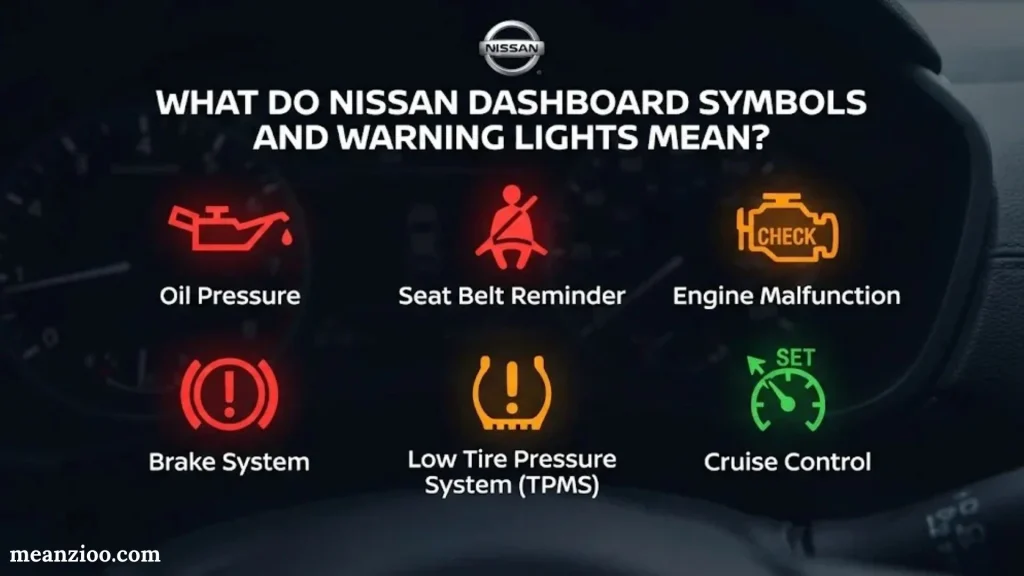
Nissan dashboard symbols are visual signals that communicate your vehicle’s condition, operating status, and detected problems. They appear on the instrument cluster, driver information display, or dashboard panel.
These symbols generally fall into three categories:
- Warning lights: Alert you to a potential malfunction, unsafe condition, or mechanical problem.
- Indicator lights: Confirm that a vehicle feature or system is active.
- Maintenance reminders: Notify you when scheduled maintenance or routine servicing is due.
For example, a red oil pressure warning light may indicate a serious lubrication problem. A green turn signal simply confirms that your directional signal is operating.
The distinction matters. Ignoring a serious warning could damage your engine or put you at risk. Mistaking a normal indicator for a fault could cause unnecessary worry.
Nissan Dashboard Warning Light Colors Explained
Warning light colors provide a quick way to judge urgency. However, you should always consider the actual symbol and accompanying dashboard message.
Red dashboard warning lights
Red lights generally indicate a serious problem or safety concern. Some require you to stop immediately when it’s safe.
Yellow or amber dashboard warning lights
These indicate a detected fault, caution, or condition that needs attention. Some allow cautious driving while others require immediate action.
Green dashboard indicators
Green lights generally confirm that a feature is active or operating.
Blue dashboard indicators
Blue lights usually identify a specific operating condition, such as high-beam headlights.
White dashboard indicators
White symbols often display system information, selected settings, or vehicle status.
What Does a Flashing Nissan Dashboard Light Mean?
A flashing dashboard light often signals a condition that requires more attention than a steady indicator. However, the exact meaning depends on the symbol.
For example, a flashing check engine light may indicate an active engine misfire that could damage the catalytic converter. A blinking turn signal usually means the directional signal is operating, although unusually fast blinking may indicate a failed bulb.
Always identify the actual symbol before deciding how serious the problem is.
Common Nissan Dashboard Warning Lights and Their Meanings
The following reference covers the most common Nissan warning lights across conventional gasoline, diesel, and selected newer models. Symbols and equipment vary by vehicle, so use the descriptions to identify the system and confirm the exact meaning in your owner’s manual.
Note: Emoji and text illustrations below are identification aids, not exact Nissan dashboard artwork.
Red Nissan Dashboard Warning Lights
Red dashboard lights deserve special attention. Some indicate a condition that could damage the vehicle or compromise safety within minutes.
Oil Pressure Warning Light
Stop safely
Indicates dangerously low engine oil pressure or a lubrication problem. Stop the engine as soon as safely possible.
Brake System Warning Light
Safety critical
May indicate the parking brake is engaged, brake fluid is low, or the braking system has a fault.
Engine Temperature Warning
Stop and cool down
Indicates excessive engine temperature on vehicles equipped with this warning.
Battery / Charge Warning Light
Check charging system
Indicates a possible charging system problem that could eventually leave the vehicle without electrical power.
Seat Belt Warning Light
Fasten seat belts
Reminds the driver or detected occupant to fasten a seat belt.
Door Open Warning Light
Secure doors
Indicates that a door, hatch, or other monitored opening may not be properly closed.
Brake Warning Light
The brake warning light is one of the most important Nissan dashboard symbols. It often appears when the parking brake remains engaged. However, it may also signal low brake fluid or a braking system problem.
If the light stays on after releasing the parking brake, don’t assume the issue is minor.
Possible causes include:
- Parking brake not fully released.
- Brake fluid level below the recommended range.
- Hydraulic brake system leak.
- Faulty brake switch or sensor.
- Brake system malfunction.
What to do: Park safely and verify that the parking brake has fully released. If the light remains on, especially with a soft brake pedal, reduced braking, or unusual noises, stop driving and arrange professional assistance.
Engine Oil Pressure Warning Light
The oil pressure warning light looks like an oil can. It indicates that the engine may not be receiving adequate oil pressure to lubricate moving components.
Low oil pressure can damage crankshaft bearings, camshafts, and other internal engine parts. Even a short drive under poor lubrication conditions can cause severe damage.
Possible causes include:
- Low engine oil level.
- Oil pump malfunction.
- Oil leak.
- Blocked oil pickup or oil passage.
- Incorrect oil viscosity.
- Internal engine wear.
What to do: Pull over safely and switch off the engine. Allow the vehicle to sit before checking the dipstick if your model uses one. Adding oil may help if the level is low, but it won’t fix a failed oil pump or other pressure problem.
Never continue driving while the oil pressure warning remains illuminated.
Battery and Charging System Warning Light
The battery-shaped warning symbol usually points to a problem with the vehicle’s charging system, not simply a weak battery.
Your alternator normally supplies electrical power while the engine runs and helps recharge the battery. If the charging system fails, the vehicle may continue operating temporarily using battery power alone.
Common causes include:
- Faulty alternator.
- Loose or damaged battery connections.
- Broken alternator belt, where applicable.
- Battery failure.
- Wiring or charging circuit problems.
You may also notice dim headlights, electrical accessories acting strangely, or difficulty restarting the engine.
What to do: Turn off unnecessary electrical accessories and safely head toward assistance only if the vehicle remains safe to operate. If the warning accompanies overheating, belt failure, or other serious symptoms, stop and arrange towing.
Engine Temperature Warning Light
The engine temperature warning indicates that the engine may be overheating. Excessive heat can damage cylinder heads, seals, engine oil, and other components.
Possible reasons include:
- Low coolant level.
- Coolant leakage.
- Faulty thermostat.
- Radiator blockage.
- Cooling fan failure.
- Water pump malfunction.
You may notice steam, a hot smell, reduced engine power, or coolant leaking beneath the vehicle.
What to do: Stop safely and turn off the engine when appropriate. Never remove a radiator cap or pressurized coolant reservoir cap while the engine is hot. Wait until the engine cools before checking coolant levels.
If the warning returns or coolant is leaking, arrange professional inspection.
Seat Belt Warning Light
The seat belt warning light reminds the driver or passenger to fasten their seat belt. Many Nissan vehicles also use a chime to reinforce the reminder.
If the warning continues after everyone has buckled up, possible causes include:
- Seat belt not fully latched.
- Passenger seat occupancy detection.
- Objects placed on the passenger seat.
- Seat belt buckle sensor malfunction.
Fasten every occupied seat before driving. Never rely on the warning light to confirm that your seat belt will protect you in a crash.
Yellow and Amber Nissan Dashboard Warning Lights
Yellow or amber warning lights often indicate a detected fault, caution, or condition requiring attention. Their urgency varies, so check the accompanying message and vehicle behavior.
Check Engine Light (MIL)
Indicates a potential engine, fuel, ignition, or emissions-related fault.
ABS Warning Light
Indicates a possible malfunction in the anti-lock braking system.
Low Tire Pressure Warning
Indicates that one or more tires may have insufficient pressure or the monitoring system may have a fault.
Airbag Warning Light
Indicates a potential problem with the supplemental restraint system.
Master Warning Light
Signals that the vehicle has a warning or condition requiring attention, often accompanied by a display message.
Power Steering Warning Light
Indicates a possible power steering system malfunction or loss of assistance.
Transmission Warning Light
Signals a transmission-related problem or abnormal operating condition on equipped models.
Check Engine Light
The check engine light is one of the most recognizable Nissan dashboard warning lights. It connects to the vehicle’s engine control and emissions monitoring systems.
The light can appear for several reasons. Sometimes the problem is relatively simple, such as a fuel cap that hasn’t sealed correctly. In other cases, the engine may have an ignition, fuel injection, sensor, or emissions problem.
Common causes include:
- Loose or improperly sealed fuel cap on applicable models.
- Faulty oxygen sensor.
- Ignition coil or spark plug problems.
- Fuel system malfunction.
- Mass airflow sensor problems.
- Emissions control system fault.
- Catalytic converter performance issue.
A diagnostic scan can retrieve stored diagnostic trouble codes (DTCs). These codes help technicians identify which system detected an abnormal condition. However, a code doesn’t always identify the exact failed part.
Solid vs. Flashing Check Engine Light
| Light behavior | Possible meaning | What to do |
| Solid check engine light | Engine or emissions fault detected | Check symptoms and arrange diagnosis |
| Flashing check engine light | Potentially severe misfire or condition that may damage the catalytic converter | Reduce load, stop driving if it continues or the engine runs rough, and arrange assistance |
| Light appears briefly at startup | Normal system self-check on many vehicles | Confirm it turns off as expected |
| Light disappears but returns later | Intermittent fault or condition detected again | Have the fault diagnosed |
If the check engine light flashes and your Nissan shakes, loses power, or runs roughly, avoid continuing the journey. A misfire can send unburned fuel into the exhaust and overheat the catalytic converter.
ABS Warning Light
The Anti-Lock Braking System (ABS) helps prevent wheel lock during hard braking. It allows drivers to maintain more steering control while braking on slippery surfaces.
An illuminated ABS warning light usually means the anti-lock function has a problem. Conventional braking may still work, but the ABS may not activate when needed.
Potential causes include:
- Faulty wheel speed sensor.
- Damaged sensor wiring.
- ABS control module problem.
- Electrical fault.
- Issues with related braking system components.
What to do: Drive cautiously only if conventional braking feels normal and the road conditions permit it. Leave extra space between vehicles and avoid sudden braking. If the brake warning light appears alongside ABS, or the pedal feels abnormal, stop safely and seek assistance.
Low Tire Pressure Warning Light (TPMS)
The Tire Pressure Monitoring System (TPMS) tracks tire pressure and warns you when a monitored tire falls below the vehicle’s specified threshold.
Low pressure can increase heat buildup and tire wear. It may also reduce handling stability, increase stopping distances, and raise the risk of tire damage.
The warning may appear because of:
- A slow puncture.
- Natural air loss.
- Cold weather causing pressure changes.
- A damaged tire.
- TPMS sensor malfunction.
Check tire pressure using a reliable gauge when the tires are cold. Inflate each tire to the pressure listed on the driver’s door-jamb label rather than the maximum pressure printed on the tire sidewall.
If the warning flashes for about a minute after starting and then remains on in some Nissan models, it may indicate a TPMS system fault rather than low tire pressure. Check the specific owner’s manual.
Airbag Warning Light
The airbag warning light monitors the supplemental restraint system (SRS). That system can include airbags, crash sensors, control modules, and seat belt pretensioners.
When the light remains on or behaves abnormally, the system may not work correctly during a collision.
Possible causes include:
- Faulty crash sensor.
- Airbag wiring problem.
- Seat belt pretensioner malfunction.
- SRS control module fault.
- Electrical connection issue.
Avoid attempting to repair airbag wiring yourself. Airbag components can deploy unexpectedly if handled incorrectly. Have a qualified technician inspect the system.
Power Steering Warning Light
Many newer Nissan vehicles use electric power steering (EPS) rather than a traditional hydraulic system. This warning may indicate that the steering assistance system has detected a fault.
You might notice heavier steering, especially when parking or making tight turns. The steering wheel may still move, but it can require much more effort.
Possible causes include:
- Electric power steering motor fault.
- Steering control module problem.
- Low voltage or electrical supply issues.
- Sensor or wiring malfunction.
If steering becomes difficult, unpredictable, or unsafe, stop driving. Don’t risk losing control just because the vehicle can still move.
Master Warning Light
The master warning light usually appears as a triangle containing an exclamation mark. It serves as a general alert rather than identifying one specific mechanical component.
Depending on your Nissan model, the light may accompany messages about:
- Low fuel.
- Key detection problems.
- Door or hatch status.
- Tire pressure.
- Intelligent key issues.
- Vehicle operating conditions.
The master warning light is best understood as a signal to check the driver information display. The message often provides more useful details than the triangle alone.
Nissan Dashboard Indicator Lights and Their Meanings
Not every illuminated dashboard symbol indicates a problem. Many Nissan dashboard indicator lights simply tell you that a feature is operating or a setting has been selected.
Knowing the difference between indicators and warning lights prevents unnecessary concern. It also helps you recognize when a normal feature changes into a system fault.
Turn Signal Indicators
Green arrows flash when the left or right turn signal operates. Both arrows may flash when hazard lights are activated.
High Beam Indicator
The blue headlight symbol indicates that high-beam headlights are switched on.
Headlight and Exterior Light Indicator
Shows that the vehicle’s exterior lights are operating in the selected mode.
Fog Light Indicator
Confirms that the front fog lights are switched on where equipped.
Cruise Control Indicator
Shows cruise control is enabled or a speed has been set, depending on the symbol.
Slip or Traction Control Indicator
May flash when traction or stability control intervenes to help maintain grip.
VDC OFF Indicator
Shows that Vehicle Dynamic Control has been switched off or disabled under certain conditions.
Snow Mode Indicator
Confirms that Snow Mode or a similar driving mode is selected on equipped vehicles.
Turn Signal Indicator Lights
The turn signal arrows usually blink when you activate the left or right directional signal. Both arrows flash when you turn on the hazard lights.
If an indicator blinks faster than usual, a signal bulb may have failed on some vehicles. Check the exterior lights to confirm that each one works.
High Beam Indicator
The blue high-beam indicator appears when your headlights illuminate at their higher setting. High beams improve visibility on dark roads when no nearby traffic could be dazzled.
Switch to low beams when approaching other vehicles or following someone closely. Bright headlights can temporarily impair another driver’s vision.
Slip Indicator and Traction Control
The slip indicator resembles a car with wavy lines underneath. It may flash when the Vehicle Dynamic Control (VDC) or traction control system intervenes.
During acceleration on slippery roads, the system can reduce engine power or apply braking to individual wheels. A brief flashing light during intervention may be normal.
However, a light that remains on may indicate that the system is disabled or malfunctioning. Check whether VDC has been switched off intentionally and consult your manual if the warning persists.
Cruise Control and Intelligent Cruise Control
Nissan vehicles equipped with cruise control may show separate indicators for cruise control activation and speed setting.
Intelligent Cruise Control (ICC), where available, can also display distance settings, detected vehicles, and system status.
These symbols aren’t necessarily warnings. However, a separate malfunction indicator or message may appear if the system cannot operate properly.
Nissan Keyless Entry, Security, and Ignition Symbols
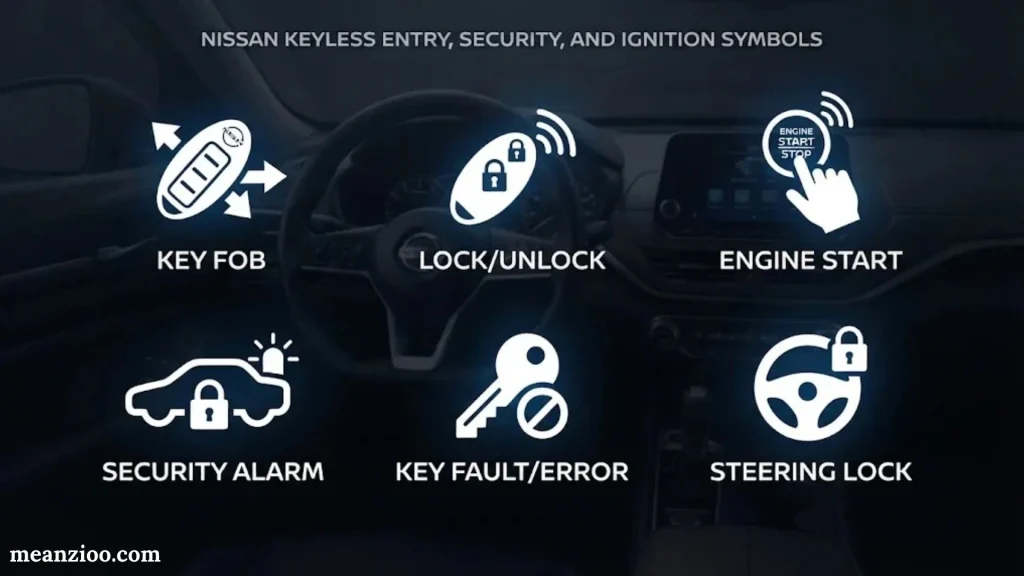
Modern Nissan vehicles rely on electronic keys, immobilizers, and push-button ignition systems. These features make starting and securing the vehicle more convenient, but they can also display warning symbols when detection fails.
Key Not Detected Warning
This warning appears when the vehicle cannot detect the Intelligent Key where required. The key might be outside the vehicle, its battery may be weak, or interference could affect detection.
Common reasons include:
- Key left outside the cabin.
- Weak key-fob battery.
- Electronic interference.
- Key recognition or antenna problem.
- Fault in the Intelligent Key system.
Try moving the key closer to the vehicle’s designated detection area. If the key battery is weak, use the backup starting procedure described in your Nissan owner’s manual.
Intelligent Key Battery Warning
A low key battery can reduce remote range and make unlocking or starting less reliable.
Replace the battery using the correct type listed in the owner’s manual. Avoid waiting until the remote stops working completely because that can leave you struggling to access the vehicle.
Security Indicator Light
The security indicator often flashes when the vehicle is locked and the theft-deterrent system is armed. That blinking is typically normal.
However, if the security light stays on while the ignition is in the ON position and the engine won’t start, the vehicle immobilizer may not recognize the key.
Try the registered key again. If the problem continues, Nissan recommends checking the immobilizer system and bringing the registered keys for service when necessary.
Shift P Warning Light
Some Nissan models display a shift-to-Park warning if the driver needs to place the transmission in Park before switching off the vehicle or performing another operation.
The warning can occur if:
- The gear selector isn’t fully in Park.
- The vehicle detects an incorrect parking sequence.
- The shift system isn’t registering the Park position correctly.
Move the selector to Park and check the message again. If the warning remains despite selecting Park correctly, the shift control system may need inspection.
Nissan Dashboard Symbols for Hybrid and Electric Vehicles
Electric and hybrid Nissan vehicles use additional dashboard symbols to communicate battery conditions, electric powertrain operation, and energy recovery.
These indicators are particularly important because an electric vehicle doesn’t always behave like a conventional gasoline-powered car.
EV System Warning Light
The EV system warning light may indicate a problem with the electric powertrain, high-voltage system, or related electronic components.
If the warning appears alongside reduced power, abnormal noises, or other serious messages, stop safely and follow the vehicle’s instructions.
Don’t attempt to open or repair high-voltage components yourself. Electric vehicle systems require appropriate training and safety equipment.
High-Voltage Battery Charge Indicator
This display shows the remaining battery charge or available energy. It helps you estimate how far you can travel before charging.
Actual driving range depends on several factors:
- Driving speed.
- Outside temperature.
- Heating and air conditioning use.
- Terrain and elevation.
- Traffic conditions.
- Battery condition.
- Driving style.
The battery charge display is not necessarily a malfunction warning. However, a separate battery fault or temperature warning requires attention.
Regenerative Braking Indicator
Regenerative braking captures some energy during deceleration and sends it back to the battery. It reduces energy waste and helps extend driving range.
Depending on the vehicle, a dashboard display may show energy recovery, regenerative braking activity, or available regeneration levels.
If regenerative braking behaves differently, a selected driving mode or battery condition may explain it. Check your vehicle’s information display before assuming the system has failed.
READY Indicator
The READY indicator means the electric vehicle or hybrid is ready to drive. The vehicle may be ready even when the engine isn’t running or producing any sound.
Always check the READY status before assuming the car is off. Electric vehicles can move quietly and unexpectedly if the driver selects a gear.
Power Limitation Warning
A power limitation warning means the vehicle may restrict acceleration or available power. This can happen because of battery temperature, system protection, or a detected powertrain condition.
If the vehicle suddenly struggles to accelerate, avoid merging into fast traffic or attempting risky overtaking. Follow the displayed instructions and arrange assistance if the warning persists.
Nissan Dashboard Warning Lights: What Can You Drive With?
One of the most common questions drivers ask is whether they can continue driving after a warning appears. The answer depends on the affected system, the warning’s severity, and how the vehicle behaves.
Some warnings allow you to reach a repair facility cautiously. Others mean you should stop immediately.
| Nissan warning light | Can you drive? | Recommended action |
| Oil pressure warning | No | Stop safely and shut off engine |
| Engine overheating | No | Stop safely and let the engine cool |
| Brake warning | Depends on cause | Stop if braking feels abnormal; inspect parking brake |
| Flashing check engine | Generally no | Stop driving if flashing continues; arrange assistance |
| Solid check engine | Sometimes | Drive cautiously only if no serious symptoms; arrange diagnosis |
| Battery/charging warning | Limited | Seek assistance promptly; stop if electrical or belt-related symptoms appear |
| ABS warning alone | Cautiously, if normal braking remains | Reduce speed and arrange inspection |
| TPMS warning | Depends on tire condition | Check pressure and inspect tires before driving |
| Airbag warning | Vehicle may drive normally | Arrange inspection promptly; restraint systems may be compromised |
| Power steering warning | Depends on steering response | Stop if steering effort or control becomes unsafe |
| Low washer fluid | Usually yes | Refill soon; avoid driving with impaired visibility |
| Door open warning | No until secured | Close and confirm all doors and hatch are latched |
This table provides general guidance, not a substitute for the exact instructions displayed in your Nissan or its owner’s manual.
Warning Lights That Require Immediate Stopping
Pull over as soon as safely possible if you notice:
- Red engine oil pressure warning.
- Engine overheating warning.
- Brake warning with reduced braking performance.
- Flashing check engine light accompanied by rough running.
- Severe powertrain malfunction or loss of control.
- Steering failure or sudden difficulty controlling the vehicle.
- Smoke, steam, burning smells, or unusual mechanical noises.
Choose a safe location away from traffic. If you cannot safely move the vehicle, prioritize your safety and call for roadside assistance.
Warning Lights That May Allow Cautious Driving
Some warning lights don’t necessarily require an immediate roadside stop if the vehicle behaves normally. Examples include a solid check engine light, an ABS warning without braking symptoms, or an airbag warning.
Still, these warnings shouldn’t be ignored. A fault could affect emissions, braking assistance, or crash protection. Reduce unnecessary driving and arrange inspection as soon as practical.
What to Do When a Nissan Dashboard Warning Light Comes On
When a warning appears, avoid guessing or repeatedly restarting the vehicle. A few simple steps can help you respond safely and identify the problem.
Identify the symbol
Look at the dashboard icon, warning color, and accompanying message. Check whether the light flashes or stays illuminated.
Assess the vehicle
Notice unusual engine noises, smoke, smells, vibration, temperature changes, or steering and braking problems.
Stop safely when necessary
Pull over without abrupt maneuvers. Switch off the engine if the warning requires it.
Perform basic checks
Inspect tire pressure, fuel level, parking brake, and fluid levels only when safe.
Arrange professional diagnosis
If the warning persists or indicates a fault, contact a qualified technician.
Check the Dashboard Message First
Many Nissan vehicles display an additional message alongside a warning symbol. This message may tell you to check the tire pressure, shift into Park, inspect the key, or stop the vehicle.
Read the full message rather than relying on the symbol alone. Two similar icons may indicate different conditions depending on the system and model.
Check Engine Oil Level Safely
If your Nissan displays an oil-related warning, checking the oil level may help identify an obvious problem. Park on level ground and follow the manual’s procedure.
However, remember that the oil pressure warning and oil level are not identical. An engine can have sufficient oil but still experience dangerously low oil pressure.
If the pressure warning remains on, shut down the engine and seek professional help.
Check Tire Pressure Correctly
When the TPMS warning appears, inspect all tires for visible damage. Use a tire pressure gauge and compare the readings with the recommended pressure listed on the driver’s door-jamb label.
Don’t inflate tires to the maximum pressure shown on their sidewalls unless the vehicle manufacturer specifically instructs you to do so.
If a tire looks flat, damaged, or bulging, don’t drive on it.
Don’t Clear Fault Codes Without Understanding Them
Disconnecting the battery or clearing diagnostic codes might temporarily turn off certain warning lights. However, doing so doesn’t repair the underlying fault.
Clearing codes can also remove useful diagnostic information. Let a technician identify the problem before resetting the system.
Why Nissan Dashboard Warning Lights Stay On
A warning light that remains illuminated usually means the system still detects a condition, a fault remains stored, or a reset procedure hasn’t been completed.
The reason depends on which symbol appears and whether the vehicle behaves differently.
| Possible reason | What it means |
| Active mechanical fault | A component isn’t working within its expected range |
| Electrical problem | Voltage, wiring, connection, or power supply may be abnormal |
| Faulty sensor | The system may receive incorrect information from a sensor |
| Stored diagnostic code | The vehicle recorded a fault that may need investigation |
| Maintenance reminder | A scheduled service interval has been reached |
| System not initialized | A monitoring or control system may need a required reset or calibration |
| Temporary condition | A warning may appear under certain operating conditions and disappear when corrected |
Dashboard Light Comes On and Then Goes Off
A warning light that disappears doesn’t always mean the problem has resolved permanently.
For example, an intermittent sensor fault may only occur under certain temperatures or driving conditions. A tire pressure warning may disappear after the pressure returns to an acceptable range.
Monitor the vehicle closely. If the warning repeatedly returns, arrange a diagnostic inspection.
Multiple Nissan Warning Lights Appear at Once
Several warning lights may illuminate simultaneously when one fault affects multiple systems.
For example, low battery voltage or a charging system problem can affect electronic modules, sensors, and driver assistance systems. The vehicle may display several alerts even though one electrical problem triggered them.
Don’t assume every illuminated system has failed independently. A diagnostic scan can help technicians identify the underlying issue.
Nissan Dashboard Light Flashing While Driving
A flashing warning light deserves careful attention because some faults become more serious when the vehicle continues operating.
A flashing check engine light is particularly concerning when accompanied by:
- Engine shaking or rough running.
- Loss of acceleration.
- Unusual exhaust smells.
- Reduced engine power.
- Abnormal noise.
Stop safely if the symptoms continue. Avoid high speeds or heavy acceleration and arrange assistance if the engine runs poorly.
Nissan Dashboard Symbols by Model
Nissan uses different instrument clusters, displays, and system configurations across its lineup. The symbol itself may look slightly different depending on the vehicle’s year, trim, and available features.
Here’s a quick overview of the types of symbols you may encounter in popular Nissan models.
| Nissan model | Common dashboard symbols and alerts |
| Nissan Altima | Check engine, oil pressure, brake, ABS, TPMS, airbag, VDC, and driver assistance indicators |
| Nissan Sentra | Engine malfunction, tire pressure, key detection, brake, seat belt, and security indicators |
| Nissan Rogue | AWD, engine, TPMS, automatic emergency braking, lane assistance, and cruise control indicators |
| Nissan Pathfinder | Transmission, braking, VDC, driver assistance, engine, and four-wheel drive indicators where equipped |
| Nissan Frontier | Engine, oil, battery, tire pressure, four-wheel drive, traction control, and towing-related indicators |
| Nissan Versa | Check engine, fuel, brake, ABS, TPMS, Intelligent Key, and lighting indicators |
| Nissan Kicks | Engine, tire pressure, brake, security, traction control, and driver assistance indicators |
| Nissan LEAF | EV system, battery charge, power limitation, regenerative braking, charging, and READY indicators |
| Nissan Murano | Engine, transmission, ABS, TPMS, VDC, safety systems, and driver assistance indicators |
This is a general model overview, not a complete symbol inventory for every model year. Equipment and dashboard layouts vary.
Nissan Altima Dashboard Symbols
The Nissan Altima includes familiar warning lights for engine operation, oil pressure, charging, braking, airbags, and tire pressure.
Depending on the year and trim, it may also display driver assistance indicators, cruise control status, traction control, and electronic stability control alerts.
If the instrument cluster displays a warning message, read the message before taking action. The same symbol can have different instructions depending on the vehicle’s equipment.
Nissan Rogue Dashboard Symbols
The Nissan Rogue may feature AWD indicators, driver assistance symbols, and advanced braking alerts alongside standard engine and safety warnings.
Depending on the equipment, you may see symbols related to:
- Intelligent Cruise Control.
- Lane departure systems.
- Blind Spot Warning.
- Automatic Emergency Braking.
- AWD operation.
- Tire pressure monitoring.
These systems may temporarily become unavailable when sensors can’t detect road markings, vehicles, or obstacles correctly.
Nissan Sentra Dashboard Symbols
The Nissan Sentra uses conventional instrument panel indicators for engine, braking, tire pressure, security, keyless entry, and safety systems.
A check engine light, ABS warning, or airbag light should never be mistaken for a routine maintenance reminder. These symbols indicate systems that may require diagnostic attention.
Nissan Frontier Dashboard Symbols
The Nissan Frontier may display additional symbols related to four-wheel drive, traction control, towing, or off-road operation.
If a four-wheel drive indicator flashes or a drivetrain warning appears, follow the specific instructions for your truck’s transfer case and drivetrain configuration. Avoid forcing a mode change if the system isn’t accepting it.
Nissan LEAF Dashboard Symbols
The Nissan LEAF uses electric vehicle indicators that aren’t found in conventional gasoline models.
These may include:
- EV system warnings.
- Battery charge indicators.
- Charging-related alerts.
- Regenerative braking information.
- READY status.
- Power limitation warnings.
Check the LEAF owner’s manual before responding to unfamiliar high-voltage battery or powertrain symbols.
How to Reset Nissan Dashboard Warning Lights
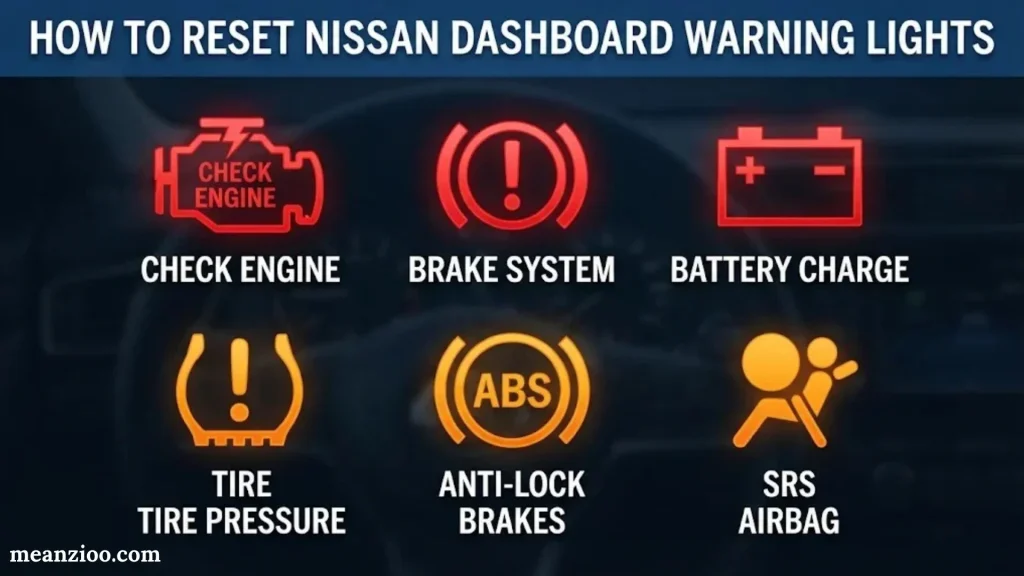
Some Nissan dashboard lights disappear automatically after you correct the condition. Others remain illuminated until a technician repairs the fault or performs a required procedure.
Resetting a warning light without fixing the problem can hide an important issue.
Which Nissan Warning Lights Reset Automatically?
Some indicators turn off when the monitored condition returns to normal.
Examples include:
- Low tire pressure warning after correcting tire pressure, when the system updates normally.
- Door-open warning after closing the door properly.
- Seat belt warning after fastening the seat belt.
- Turn signal indicators after canceling the signal.
- Some temporary system alerts after the operating condition clears.
The exact behavior depends on your Nissan model and system.
How to Reset the Tire Pressure Warning Light
If the tire pressure warning appears, follow these steps:
- Park on level ground in a safe location.
- Allow the tires to cool if you’ve been driving.
- Check pressure in all tires using a reliable gauge.
- Inflate tires to the recommended cold pressure on the door-jamb label.
- Drive as directed by the owner’s manual so the TPMS can update.
- If the warning remains, check for a puncture or sensor problem.
Some Nissan models have specific TPMS initialization or reset procedures. Others update automatically after driving.
Can You Reset the Nissan Check Engine Light?
You may be able to clear a diagnostic code using an OBD-II scanner. However, clearing the code doesn’t repair the fault.
For example, if a faulty oxygen sensor triggers the check engine light, clearing the code won’t restore the sensor’s operation. The light may return after the vehicle runs another diagnostic test.
Before resetting a warning:
- Record the diagnostic trouble code.
- Identify the system that triggered it.
- Investigate the underlying cause.
- Repair the problem.
- Clear the code only when appropriate.
- Confirm that the warning doesn’t return.
Which Warning Lights Should Never Be Reset Without Inspection?
Never treat these warnings as simple reset issues:
- Engine oil pressure warning.
- Brake system warning.
- Engine overheating warning.
- Airbag or SRS warning.
- Charging system warning.
- Transmission malfunction warning.
- EV system warning.
These lights can indicate conditions that affect vehicle safety, reliability, or component protection.
Nissan Dashboard Warning Lights vs. Maintenance Reminder Lights
Not every dashboard notification means something has failed. Nissan vehicles also display maintenance reminders that help you keep up with routine service.
Understanding this difference can prevent confusion.
| Dashboard notification | Purpose | Typical response |
| Check engine light | Detects engine or emissions-related faults | Diagnostic inspection |
| Oil pressure warning | Indicates a possible lubrication pressure problem | Stop engine immediately |
| ABS warning | Alerts you to an anti-lock braking system fault | Arrange inspection |
| TPMS warning | Indicates low tire pressure or monitoring system fault | Check tire pressure |
| Maintenance reminder | Tracks scheduled maintenance | Arrange routine service |
| Oil change reminder | Indicates a programmed service interval | Change oil as recommended |
| Tire rotation reminder | Reminds you to rotate tires | Schedule tire rotation |
| Brake pad maintenance reminder | Alerts you to brake service needs on equipped models | Inspect braking components |
What Does the Service Soon Light Mean?
A service-related light or message can indicate that your vehicle needs maintenance or diagnostic attention.
However, the exact meaning depends on the wording and the model. Some Nissan vehicles use maintenance reminder menus that allow owners to set service intervals.
Don’t assume every service message means the engine has a fault. Check the dashboard message and maintenance menu to understand what your vehicle requests.
Why Maintenance Reminders Matter
Routine maintenance keeps important systems working properly and can reduce the risk of preventable failures.
Depending on the Nissan model and driving conditions, scheduled service may include:
- Engine oil and filter replacement.
- Tire rotation.
- Brake inspection.
- Air filter replacement.
- Coolant inspection.
- Battery testing.
- Tire pressure checks.
- Transmission service where specified.
Follow the maintenance schedule for your exact vehicle rather than applying the same intervals to every Nissan.
How to Find the Correct Nissan Dashboard Symbol in Your Owner’s Manual
Your Nissan owner’s manual is the most reliable reference for identifying a dashboard symbol on your particular vehicle.
A symbol’s appearance or meaning may differ across model years. Some vehicles also include advanced driver assistance systems that newer or older versions don’t have.
To find the correct information:
- Identify your Nissan model and model year.
- Confirm the trim level and powertrain when relevant.
- Open the owner’s manual.
- Find the section titled Warning Lights, Indicator Lights and Audible Reminders or a similar heading.
- Match the symbol to the illustration.
- Read the recommended action and related warning message.
You can access official Nissan manuals here:
Nissan provides manuals by model and year. Some equipped vehicles also offer access to a digital owner’s manual through the in-vehicle display or MyNISSAN resources.
If a warning light indicates a possible safety problem, don’t wait for the manual lookup to finish before stopping safely.
Frequently Asked Questions About Nissan Dashboard Symbols and Meanings
What Are the Most Serious Nissan Dashboard Warning Lights?
The most serious warning lights generally include the engine oil pressure, brake system, engine temperature, and certain charging or powertrain warnings.
These lights may indicate conditions that can damage your vehicle or affect your ability to drive safely. Stop when necessary and follow the instructions displayed by your Nissan.
What Does a Yellow Warning Light Mean on a Nissan?
A yellow or amber warning light usually indicates a problem, caution, or system condition that needs attention. It doesn’t always mean you must stop immediately.
For example, a TPMS light may indicate low tire pressure. The check engine light may signal an emissions or engine problem. Check the symbol and accompanying message before deciding whether to continue driving.
Can I Drive My Nissan With the Check Engine Light On?
Sometimes, but it depends on the warning light and how the vehicle behaves.
A solid check engine light without noticeable symptoms may allow cautious driving to a repair facility. However, a flashing light accompanied by shaking, poor acceleration, or unusual engine noise requires more urgent attention.
If the engine runs rough or the warning flashes continuously, stop safely and arrange assistance.
Why Is My Nissan Dashboard Showing Multiple Warning Lights?
Multiple warning lights may appear when one electrical or system-related problem affects several vehicle components.
Possible causes include low battery voltage, charging system problems, communication faults, or a malfunction that disables related safety systems.
A diagnostic scan can help identify the underlying problem rather than treating every illuminated light separately.
What Does the Nissan Master Warning Light Mean?
The master warning light is a general alert that tells you the vehicle needs attention. It often appears with an additional message on the driver information display.
The message may identify a key detection problem, low fuel, door status, tire pressure, or another condition. Check the display for the specific issue.
Why Is My Nissan Tire Pressure Light Still On After Inflating the Tires?
The tire pressure light may remain on because the system hasn’t updated yet, a tire still has incorrect pressure, or a TPMS sensor has a problem.
Check all tires when cold and use the pressure specified on your vehicle’s door-jamb label.
If the light flashes before remaining illuminated or continues appearing after pressure corrections, the monitoring system may require inspection.
What Does the Blue Light on My Nissan Dashboard Mean?
A blue dashboard light commonly indicates that your high-beam headlights are active.
Blue indicators usually communicate a system status rather than a mechanical failure. However, always identify the symbol because not every blue light has the same meaning across all models.
Do Nissan Dashboard Warning Lights Turn Off Automatically?
Some warning lights turn off when the condition clears. Others stay illuminated until the fault is repaired or a required procedure is completed.
For example, a door warning should usually disappear after you close the door properly. A check engine light may remain on until the detected fault is corrected and the system completes its monitoring process.
What Does the Nissan Security Light Mean When It Blinks?
A blinking security indicator commonly means the vehicle’s theft-deterrent system is armed. This is usually normal when the vehicle is switched off and locked.
If the security light stays on while the ignition is in the ON position and the engine won’t start, the immobilizer or key recognition system may need inspection.
What Does a Nissan Key Not Detected Warning Mean?
This warning appears when the vehicle cannot detect the Intelligent Key. The key might be outside the vehicle, the battery may be weak, or electronic interference could be affecting recognition.
Move the key closer to the vehicle and try again. If the warning persists, follow the backup starting instructions in your owner’s manual.
Where Can I Find a Complete List of Nissan Dashboard Symbols?
You can find a complete symbol reference in the owner’s manual for your Nissan model and year.
Final Thoughts on Nissan Dashboard Symbols and Meanings
Nissan dashboard warning lights help you recognize potential problems, monitor vehicle systems, and make safer driving decisions. Understanding these symbols can save you from unnecessary stress and prevent small problems from becoming expensive repairs.
However, don’t judge a warning by color alone. A red light may require immediate action, while an amber light could indicate anything from a minor issue to a serious malfunction.
Keep these important reminders in mind:
- Never ignore an oil pressure or overheating warning. Continuing to drive could cause severe engine damage.
- Check flashing warning lights promptly. A flashing check engine light may indicate a serious engine misfire.
- Don’t assume every illuminated light means a breakdown. Some indicators simply show that a feature is operating.
- Read the accompanying dashboard message. It may explain the condition more clearly than the symbol.
- Use your Nissan owner’s manual. Symbols and recommended actions can differ between models and years.
- Seek professional diagnostics when necessary. Persistent warning lights often require more than a simple reset.
When an unfamiliar symbol appears, identify it before continuing your journey. Your dashboard is an early warning system, and responding correctly can protect your vehicle, your passengers, and your safety.

I’m Ryan Mitchell, and I write about modern English, trending slang, and online expressions. I enjoy explaining the meanings, origins, and real-life usage of popular words in a simple way. I believe learning slang is an important step toward understanding today’s English-speaking culture. Through my work, I aim to help readers speak more naturally and stay updated with the latest language trends.
 Charlotte Hayes