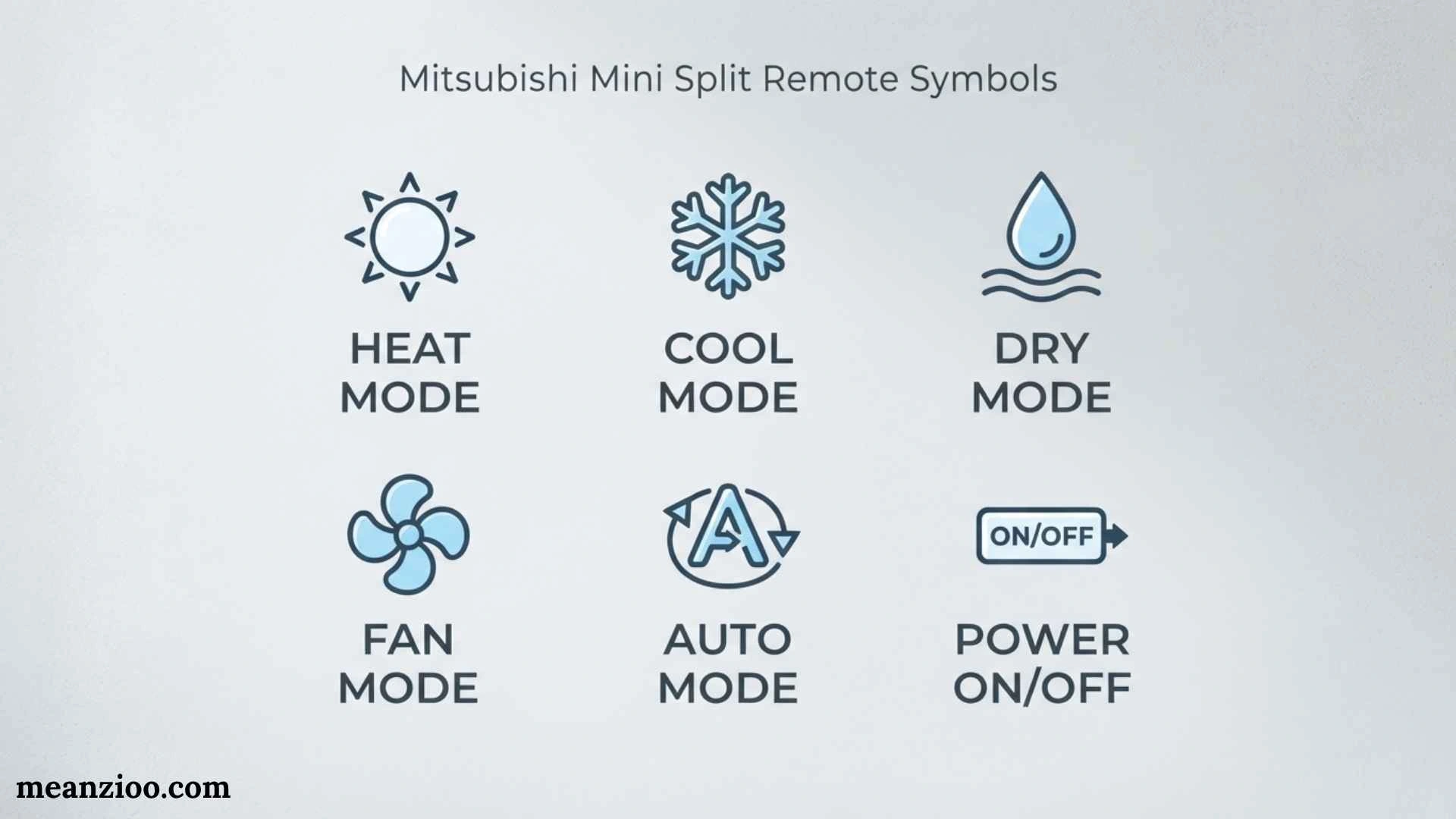
Mitsubishi mini split remote symbols can look confusing when you first use the air conditioner. A snowflake, sun, water drop, fan, arrows, clock, moon, or other small icon may appear on the display, and each one can represent a different function. Understanding these symbols makes it easier to select the right mode, adjust airflow, use timers, and recognize when a setting is active.
One important point is that Mitsubishi has different product families and remote controls. Mitsubishi Electric and Mitsubishi Heavy Industries are separate product lines, and their remotes can use different buttons, displays, and advanced functions. Even within the same brand, symbols can vary by model. Mitsubishi Electric manuals, for example, document remotes with AUTO, COOL, DRY, HEAT, FAN, fan-speed, vane, timer, ECONO COOL, and other model-dependent functions.
This guide explains the most common symbols, what they mean, how to use them, and what to do when an unfamiliar icon appears.
Mitsubishi Mini Split Remote Symbols at a Glance
Here are the most common symbols you may encounter:
| Symbol or display | Common meaning | Main purpose |
| ❄️ Snowflake | Cool | Lowers room temperature |
| ☀️ Sun | Heat | Warms the room |
| 💧 Water drop | Dry | Reduces humidity |
| 🌀 Fan | Fan | Circulates air |
| AUTO | Automatic | Automatically manages operation |
| Fan bars | Fan speed | Controls airflow strength |
| ↕️ Arrows | Vertical airflow | Changes up/down airflow |
| ↔️ Arrows | Horizontal airflow | Changes left/right airflow |
| Swing | Airflow swing | Moves louvers automatically |
| 🕒 Clock | Timer | Schedules operation |
| 🌙 Moon | Sleep | Sleep-related operation |
| ECO/Econo | Energy-saving | Adjusts operation for efficiency |
| Powerful/Turbo | High power | Reaches the selected temperature faster |
| Lock | Child/key lock | Prevents accidental button presses |
| Battery icon | Low battery | Indicates weak remote batteries |
| Cleaning/Filter | Maintenance | Indicates a cleaning-related function or reminder |
Not every Mitsubishi remote contains all of these symbols. The exact display depends on the air conditioner and remote model.
Why Mitsubishi Remote Symbols Are Different by Model
Before trying to identify an icon, check which Mitsubishi product you own.
Mitsubishi Electric and Mitsubishi Heavy Industries have different remote-control systems. Mitsubishi Electric documentation shows operation modes such as AUTO, COOL, DRY, HEAT, and FAN, while Mitsubishi Heavy Industries manuals also document functions such as HI POWER, ECONOMY, SLEEP, CLEAN, timers, airflow control, and NIGHT SETBACK on particular models.
This means an icon shown in an online picture may not appear on your remote at all.
The same is true for advanced features. One model may have i-see or ECONO COOL, while another may have different comfort or energy-saving functions.
Always use the manual for your exact indoor-unit and remote-control model when an icon has an unfamiliar meaning.
Snowflake Symbol ❄️ — Cool Mode
The snowflake symbol normally means COOL mode.
This is the standard air-conditioning mode used when you want to lower the temperature in the room.
When Cool mode is selected, you normally choose a target temperature using the temperature buttons. The system then operates to maintain the selected temperature.
When should you use Cool mode?
Use it when:
- The room is too warm.
- You want active air conditioning.
- Outdoor temperatures are high.
- You want the system to maintain a specific cooling temperature.
For example, if the room feels hot, you might select Cool mode and choose a comfortable temperature such as 24°C.
The available temperature range and behavior can vary by model.
Sun Symbol ☀️ — Heat Mode
The sun symbol commonly represents HEAT mode on a heat-pump mini split.
Heat mode allows the system to provide warm air rather than cool air.
When should you use Heat mode?
Use Heat mode when:
- The room is cold.
- You need heating during winter.
- Your Mitsubishi mini split is designed for both heating and cooling.
Not every Mitsubishi system provides heating. Mitsubishi Electric documentation distinguishes between cooling-and-heating systems and cooling-only systems, so the available modes depend on the model.
Why does the unit sometimes not blow warm air immediately?
A heat-pump system may take some time to prepare before producing warm airflow. During certain heating conditions, the indoor fan may temporarily behave differently.
Therefore, a short delay does not automatically mean the system is broken.
Water Drop Symbol 💧 — Dry Mode
The water-drop symbol generally represents DRY mode, also called dehumidification.
Dry mode is intended to reduce moisture in the indoor air. It can be useful when a room feels damp or humid.
When is Dry mode useful?
You may choose Dry mode during:
- Humid weather
- Rainy conditions
- Damp indoor conditions
- Situations where humidity is uncomfortable but strong cooling is unnecessary
Dry mode does not work exactly like normal Cool mode. Fan behavior and temperature control can differ depending on the model.
Some remotes also restrict certain fan-speed adjustments while operating in Dry mode.
Fan Symbol 🌀 — Fan Mode
A fan symbol usually indicates FAN mode.
In Fan mode, the indoor unit circulates air without performing normal cooling or heating.
Fan mode can be useful when:
- The room temperature is already comfortable.
- You only want air circulation.
- You want airflow without active cooling or heating.
Fan mode should not be confused with the separate fan-speed setting. The mode determines what the air conditioner is doing, while fan speed determines how strongly the indoor fan operates.
AUTO Symbol — Automatic Operation
The AUTO symbol indicates automatic operation.
Instead of manually choosing Cool, Heat, Dry, or another mode, the system manages operation according to its programmed controls.
The exact behavior of AUTO mode varies by model, so it is better to check the operating manual than assume every Mitsubishi system works identically.
If you prefer complete control, manually selecting Cool or Heat can make the operating mode clearer.
Fan Speed Symbols and Bars
Many Mitsubishi remotes show fan speed using bars, words, or a fan icon.
Common settings include:
- AUTO
- Low
- Medium
- High
- Super High on some models
- Silent on some models
Mitsubishi Electric documentation, for example, lists fan-speed sequences that can include Auto, Silent, Low, Medium, High, and Super High depending on the remote and model.
What does AUTO fan speed mean?
When fan speed is set to AUTO, the system controls the fan according to operating conditions.
What does high fan speed mean?
High fan speed increases airflow through the indoor unit. It can help distribute conditioned air more quickly.
What does low fan speed mean?
Low speed provides gentler airflow and may be preferable when you do not want strong air movement.
The available fan-speed levels vary by model.
Vertical Airflow Symbol ↕️
An up-and-down arrow or vane symbol usually relates to vertical airflow direction.
This controls the direction of the indoor unit’s horizontal vane.
Depending on the model, you may be able to select a particular position or allow the vane to move automatically.
Mitsubishi Electric manuals document multiple up/down airflow positions and a Swing setting on compatible systems.
Horizontal Airflow Symbol ↔️
Some Mitsubishi systems also provide left-right airflow control.
A horizontal arrow or side-to-side symbol may indicate this function.
It can be useful when you want to distribute conditioned air across the width of the room rather than directing it toward one fixed location.
However, horizontal airflow control is not available on every indoor unit.
Swing Symbol — Automatic Airflow Movement
The Swing symbol indicates that the air vane can move automatically.
Depending on the remote, Swing may control:
- Up-and-down movement
- Left-and-right movement
- Both directions on some advanced models
Some Mitsubishi Heavy Industries remotes specifically provide separate controls for up/down and left/right swing.
Swing can help distribute air across a larger area instead of continuously directing it toward one spot.
Timer and Clock Symbols 🕒
A clock or timer symbol indicates that a timer function is active or being programmed.
Depending on the remote, you may have:
- ON Timer
- OFF Timer
- Sleep Timer
- Weekly Timer
- Clock setting
Mitsubishi documentation shows timer functions that can be used to schedule when the air conditioner starts or stops.
ON Timer
An ON Timer can be used to schedule the air conditioner to start at a selected time.
OFF Timer
An OFF Timer can schedule the unit to stop.
Weekly Timer
Some Mitsubishi systems offer weekly scheduling, allowing different operating times and settings for different days.
If your timer does not operate at the expected time, check that the remote’s clock is set correctly.
Moon Symbol 🌙 — Sleep Mode
A moon symbol commonly relates to Sleep mode on compatible remotes.
Sleep functions are designed for nighttime comfort and may adjust operation according to the model’s programming.
Some Mitsubishi Heavy Industries remotes specifically include a SLEEP button, while other Mitsubishi models use different sleep-related controls.
If you see a moon icon that you did not intentionally activate, check whether Sleep mode has been selected.
ECO or ECONO Symbol — Energy-Saving Operation
An ECO, ECONO, or similar symbol can indicate an energy-saving function.
The exact behavior depends on the model.
Mitsubishi Electric’s ECONO COOL, for example, can automatically change temperature and airflow direction during cooling to maintain comfort while reducing energy use.
Mitsubishi Heavy Industries also documents Economy/ECO functions on certain models.
Do not assume that every ECO icon works in exactly the same way.
Powerful or Turbo Symbol
A Powerful, HI POWER, or Turbo function is designed to increase output temporarily so the system can reach the desired temperature more quickly.
For example, Mitsubishi Heavy Industries documentation describes HIGH POWER operation as helping the unit reach the preset temperature in the shortest possible time.
This is useful when:
- You have just entered a hot room.
- You want quicker cooling.
- You have returned to a cold room and want faster heating.
It should not be confused with increasing the actual capacity of the air conditioner.
i-see Sensor Symbol
Some Mitsubishi Electric systems have i-see Sensor technology.
On compatible models, this feature uses sensing technology to help manage room conditions and airflow.
Because i-see is not available on every Mitsubishi mini split, you should not expect to find this symbol on every remote.
If your remote includes an i-see button or indicator, consult the specific model manual for the exact operation.
i-save or Preset Symbol
Some Mitsubishi Electric remotes include i-save or preset functions.
The purpose is to save a preferred group of settings so they can be recalled easily.
For example, you may save a comfortable nighttime setting and activate it later without manually entering every setting again.
The exact options stored depend on the model.
Night Mode Symbol
Some advanced Mitsubishi Electric remotes include Night Mode.
Mitsubishi documentation describes Night Mode as a function that can change the operation indicator brightness, disable the beep sound, and limit outdoor-unit noise on compatible models.
This can be particularly useful in bedrooms or other quiet areas.
Cleaning or CLEAN Symbol
A CLEAN or cleaning-related symbol indicates a cleaning function on compatible Mitsubishi systems.
Some Mitsubishi Heavy Industries remotes include a CLEAN function, while other models may use different maintenance or self-cleaning systems.
Do not confuse an automatic cleaning function with manually cleaning the air filter.
Even if the unit has a self-cleaning feature, routine filter maintenance may still be required according to the manufacturer’s instructions.
Filter or Maintenance Symbol
A filter-related indicator can mean that maintenance is due.
A dirty filter can restrict airflow and affect system performance.
If a maintenance indicator appears:
- Turn the system off.
- Follow the model’s filter-cleaning instructions.
- Clean or replace the filter as specified.
- Reset the maintenance indicator if the manual requires it.
The exact reset procedure varies by model.
Low Battery Symbol
A small battery icon or flashing battery indicator usually means the remote batteries are becoming weak.
Possible symptoms include:
- The remote works only from a short distance.
- The air conditioner does not respond consistently.
- The display becomes faint.
- Buttons seem slow to respond.
- The battery icon flashes.
Some Mitsubishi remote manuals specify AAA/R03 batteries, but battery type should always be confirmed for the exact remote.
After replacing batteries, certain remotes may require a clock or reset procedure.
Lock or Child-Lock Symbol
A lock symbol indicates that the remote’s buttons may be locked.
The purpose is to prevent accidental changes to temperature, mode, fan speed, or other settings.
The unlocking procedure is model-specific. Some Mitsubishi Heavy Industries remotes, for example, use a button combination to activate or deactivate the lock.
If buttons stop responding but the remote display still works, check whether a lock function is active.
Transmission Symbol
Some remotes briefly show a transmission indicator when a signal is being sent to the indoor unit.
When pressing a button:
- Point the remote toward the indoor unit.
- Press the desired button.
- Look for the transmission indication.
- Check whether the indoor unit responds.
Some systems provide a beep when a signal is received correctly.
If the transmission indicator appears but the unit does not respond, check batteries, distance, obstacles, and the indoor-unit receiver.
What Is the Difference Between a Remote Symbol and an Error Code?
This is an important distinction.
A normal remote symbol usually tells you that a mode or function is active.
An error indication relates to a problem or abnormal operating condition.
Do not assume every blinking icon means the air conditioner has an error.
For some Mitsubishi Electric systems, troubleshooting information may be communicated through the indoor unit’s operation indicator rather than an error code appearing directly on the handheld remote.
If the indoor unit’s indicator is blinking unusually, consult the manual for the exact model instead of guessing what the light means.
Why Is a Mitsubishi Mini Split Symbol Blinking?
A blinking symbol can have several explanations.
It might indicate:
- A function is being activated.
- A timer is active.
- Batteries are low.
- The system is transitioning between operating conditions.
- A maintenance function is active.
- The unit is reporting an abnormal condition.
The meaning depends on which symbol is blinking and which Mitsubishi model you have.
If the air conditioner is still operating normally, check the manual before assuming there is a fault.
If the system stops working or displays a documented fault indicator, follow the manufacturer’s troubleshooting instructions.
How to Reset a Mitsubishi Mini Split Remote
The reset process varies between remote models.
Some Mitsubishi remotes have a small RESET or ACL switch/button inside or near the battery compartment. Mitsubishi documentation shows remote-control reset procedures on certain models.
A general approach is:
- Turn the air conditioner off.
- Remove the remote batteries if the manual instructs you to do so.
- Use the designated RESET/ACL control if your remote has one.
- Reinstall the batteries.
- Set the clock if required.
- Point the remote toward the indoor unit.
- Select your desired operating mode.
Do not press random combinations of buttons if you cannot identify the reset function. Use the manual for your exact remote.
What If a Symbol Will Not Disappear?
If an icon remains on the remote display, first determine whether it represents an active setting.
Check:
- Timer settings
- Sleep mode
- ECO operation
- Powerful mode
- Swing
- Airflow direction
- Lock function
- Cleaning function
- Wireless or sensor functions
Try pressing the corresponding function button again if the manual says it toggles the feature on and off.
If the icon remains after the function should be disabled, resetting the remote may help—but only follow the reset procedure specified for your model.
What If the Mitsubishi Remote Display Is Blank?
A blank display is often related to the batteries, but it is not the only possibility.
Try:
- Replace the batteries with the correct type.
- Install them in the correct direction.
- Check the battery contacts.
- Use the remote’s reset/ACL function if applicable.
- Check whether the display returns.
If the display remains blank after new batteries and the correct reset procedure, the remote itself may require inspection or replacement.
What If the Remote Works but the AC Does Not?
If the remote display looks normal but the mini split does not respond:
- Point the remote directly toward the indoor unit.
- Replace weak batteries.
- Check that the indoor unit has power.
- Make sure the remote is not locked.
- Check whether a timer is controlling operation.
- Look for abnormal indoor-unit indicator lights.
- Check the model-specific troubleshooting instructions.
A working remote display does not necessarily mean that the indoor unit has received the command.
Best Basic Settings for Everyday Use
For Normal Cooling
A simple starting setup is:
- Mode: Cool
- Temperature: Choose a comfortable setting
- Fan: Auto
- Airflow: Adjust to distribute air comfortably
- Swing: Use if you want broader airflow
For Heating
Try:
- Mode: Heat
- Temperature: Choose a comfortable target
- Fan: Auto
- Airflow: Adjust according to room layout
Allow the heat-pump system time to operate normally rather than repeatedly switching modes.
For Humid Weather
If the room feels damp:
- Try Dry mode if your model supports it.
- Avoid constantly switching between different modes.
- Monitor comfort rather than focusing only on the displayed temperature.
For Nighttime
Depending on your model, you may use:
- Sleep
- Night Mode
- Low or Auto fan
- Timer
- A preferred preset such as i-save
Available functions vary by remote.
Mitsubishi Electric vs Mitsubishi Heavy Industries Remotes
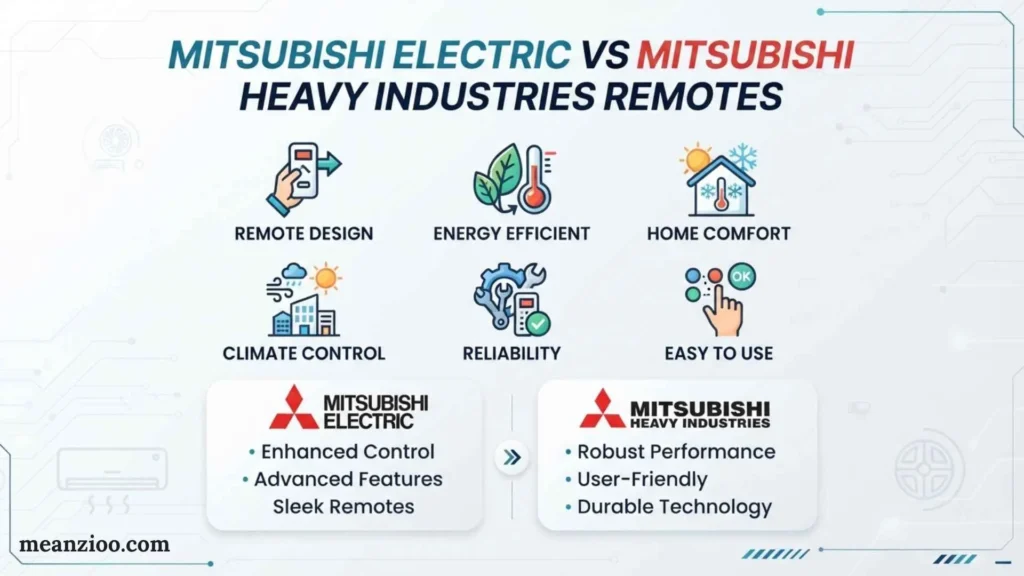
One of the biggest sources of confusion is assuming that every Mitsubishi air conditioner uses the same remote.
They do not.
Mitsubishi Electric
Mitsubishi Electric remotes can include functions such as:
- AUTO
- COOL
- DRY
- HEAT
- FAN
- FAN speed
- VANE
- WIDE VANE
- ECONO COOL
- i-save
- i-see
- POWERFUL
- NIGHT MODE
- Timers
The exact functions vary by model.
Mitsubishi Heavy Industries
Mitsubishi Heavy Industries remotes can include:
- AUTO
- COOL
- HEAT
- DRY
- FAN
- Fan speed
- HI POWER
- ECONOMY
- SLEEP
- CLEAN
- Timer
- Airflow
- SILENT
- NIGHT SETBACK
- Child Lock
Again, not every function appears on every model.
This distinction is important when searching for a replacement remote or trying to identify an unfamiliar symbol.
How to Find the Exact Meaning of Your Remote Symbols
For the most accurate answer, identify three things:
1. Brand
Look for Mitsubishi Electric or Mitsubishi Heavy Industries.
2. Indoor-unit model number
The model number is usually printed on a label attached to the indoor unit.
3. Remote-control model number
Some remotes have a model number printed on the back, inside the battery compartment, or elsewhere on the handset.
Once you have these details, use the matching operation manual.
This is much more reliable than comparing your remote with a random image online because different remotes can use different symbols and button layouts.
Frequently Asked Questions
What does the snowflake symbol mean on a Mitsubishi mini split remote?
The snowflake normally means Cool mode. It is used when you want the air conditioner to lower the room temperature.
What does the sun symbol mean?
The sun generally indicates Heat mode on a Mitsubishi heat-pump system.
What does the water drop mean?
The water drop normally represents Dry or dehumidification mode.
What does the fan symbol mean?
It generally represents Fan mode or is associated with fan-speed control, depending on where it appears on the remote.
What does AUTO mean on a Mitsubishi remote?
AUTO indicates automatic operation. The exact way the system selects or manages operation depends on the model.
What does the swing symbol mean?
Swing allows the airflow vane to move automatically, usually up and down and, on some systems, from side to side.
Why is my Mitsubishi remote showing a moon?
A moon symbol commonly indicates Sleep mode on compatible models.
What does ECO mean?
ECO or ECONO generally indicates an energy-saving function. The exact operation differs between Mitsubishi models.
What does the lock symbol mean?
It usually means the remote buttons have been locked to prevent accidental changes.
Why is my Mitsubishi remote not responding?
Check the batteries, point the remote toward the indoor unit, make sure the buttons are not locked, and check for active timers. If the problem continues, consult the model-specific manual.
Why does my remote have symbols that I cannot find online?
Mitsubishi uses many remote designs and model-specific functions. Your symbol may belong to a particular product series or advanced feature.
How do I know if a symbol is an error?
A normal function icon indicates an operating setting, while an error condition may be indicated through a specific fault display or blinking indicator. Check the documentation for your exact model rather than interpreting an unfamiliar symbol by appearance alone.
Final Thoughts
Understanding Mitsubishi mini split remote symbols becomes much easier once you know the main groups: operating modes, fan controls, airflow controls, timers, comfort features, energy-saving functions, and maintenance indicators.
The most familiar symbols are the snowflake for cooling, sun for heating, water drop for Dry mode, fan for air circulation, and AUTO for automatic operation. Other icons may represent Swing, timers, Sleep, ECO, Powerful, i-see, cleaning, lock, low battery, or model-specific features.
The most important thing to remember is that Mitsubishi Electric and Mitsubishi Heavy Industries are different product lines, and even remotes within the same brand can vary. If a symbol is unfamiliar, use the model number of your indoor unit and remote to locate the correct manual. That will give you a more reliable answer than assuming every Mitsubishi mini split uses the same icons and controls.

I’m Ryan Mitchell, and I write about modern English, trending slang, and online expressions. I enjoy explaining the meanings, origins, and real-life usage of popular words in a simple way. I believe learning slang is an important step toward understanding today’s English-speaking culture. Through my work, I aim to help readers speak more naturally and stay updated with the latest language trends.
 Charlotte Hayes