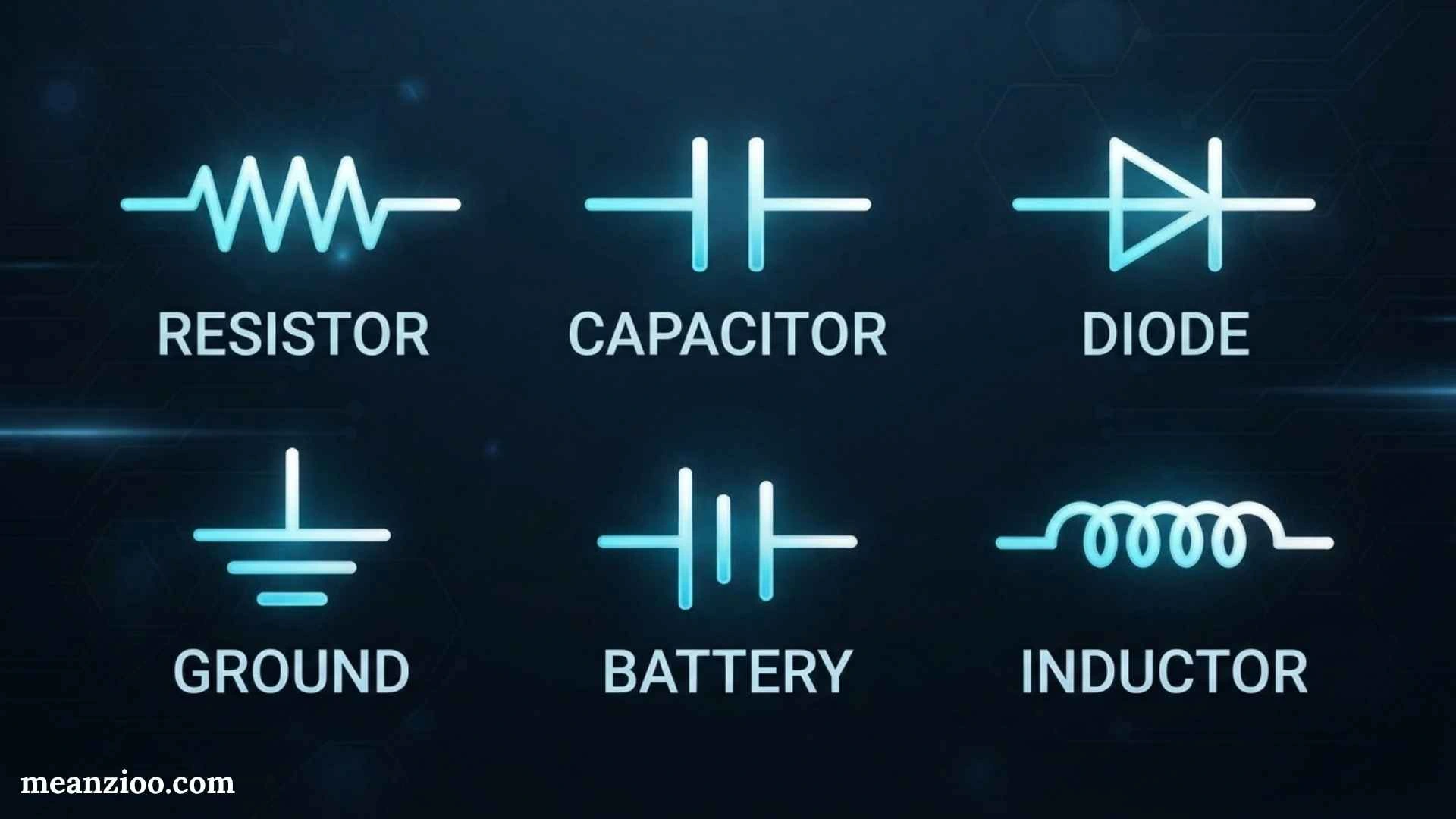
Electronic symbols are standardized graphical representations used to show electronic components and their functions in circuit diagrams. They help engineers, technicians, students, and hobbyists understand how a circuit is designed without needing to draw every physical component.
A resistor, capacitor, diode, transistor, switch, battery, sensor, or integrated circuit can be represented by a simple symbol. Once you understand these symbols, reading a schematic becomes much easier.
This complete guide covers common electronic symbols, their meanings, component categories, terminal names, schematic labels, symbol standards, and practical tips for reading circuit diagrams.
What Are Electronic Symbols?
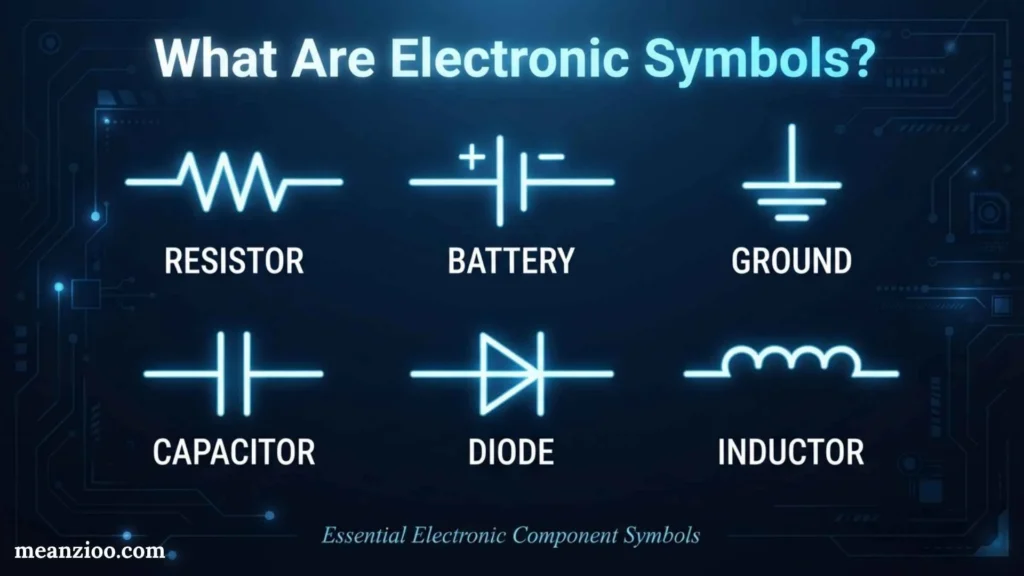
Electronic symbols are simplified drawings used in schematics to represent electrical and electronic components. A schematic focuses on electrical function and connections, rather than the physical appearance of a component.
For example, a physical resistor may have a cylindrical or rectangular body with colored bands, but its schematic symbol is normally a simple zigzag line or rectangle.
Electronic symbols create a common visual language. Instead of writing a long description for every component, a designer can use a recognized symbol and a short reference label.
Common examples include:
- Resistor
- Capacitor
- Inductor
- Diode
- LED
- Transistor
- MOSFET
- Battery
- Fuse
- Switch
- Relay
- Transformer
- Motor
- Speaker
- Sensor
- Integrated circuit
Why Are Electronic Symbols Important?
Electronic symbols make complicated circuits easier to understand, design, document, repair, and troubleshoot.
They are important because they:
- Show how components are electrically connected
- Identify different component types
- Make circuit diagrams compact
- Help technicians diagnose faults
- Allow engineers to communicate circuit designs
- Help students learn electronics
- Support PCB design and manufacturing
- Make technical documentation easier to follow
A circuit board can contain hundreds of physical components, but a schematic can organize those components into a clear logical diagram.
Main Categories of Electronic Symbols
Electronic symbols can be grouped according to the type and purpose of the components they represent.
Passive Component Symbols
Passive components generally do not provide electrical gain. Common examples include:
- Resistors
- Capacitors
- Inductors
- Transformers
These components are widely used for controlling, storing, filtering, or transferring electrical energy.
Active Component Symbols
Active electronic components can control electrical signals or provide functions such as amplification and switching.
Examples include:
- Transistors
- MOSFETs
- Integrated circuits
- Operational amplifiers
- Thyristors
Power Symbols
Power symbols identify electrical sources and reference connections.
Examples include:
- Battery
- DC voltage source
- AC voltage source
- Ground
- Positive supply
- Negative supply
Protection Symbols
Protection components help prevent damage caused by excessive current, voltage, or other electrical conditions.
Examples include:
- Fuse
- Circuit breaker
- TVS diode
- Varistor
- Zener diode
Electromechanical Symbols
These represent devices that combine electrical operation with mechanical action.
Examples include:
- Switches
- Relays
- Motors
- Solenoids
- Connectors
Common Electronic Symbols and Their Meanings
Resistor Symbol
A resistor limits or controls electrical current and creates a voltage drop.
Its symbol is commonly shown as a zigzag line in ANSI-style diagrams or a rectangle in IEC-style diagrams.
Common uses:
- Current limiting
- Voltage division
- Pull-up and pull-down circuits
- Transistor biasing
- LED current control
Resistance is measured in ohms (Ω).
Variable Resistor Symbol
A variable resistor allows resistance to be adjusted.
Its symbol resembles a resistor with an arrow indicating adjustment.
Examples include:
- Potentiometers
- Rheostats
- Trimmer resistors
They are used for volume controls, brightness adjustment, calibration, and other adjustable circuits.
Capacitor Symbol
A capacitor stores electrical energy in an electric field.
A basic capacitor is represented by two parallel plates.
Capacitors are commonly used for:
- Filtering
- Smoothing
- Signal coupling
- Decoupling
- Timing
- Energy storage
Capacitance is measured in farads (F).
Polarized Capacitor Symbol
A polarized capacitor has positive and negative terminals. The schematic normally provides a polarity indication, often a plus sign.
Electrolytic capacitors are a common example.
Polarity should be checked carefully before installing a polarized capacitor because incorrect connection can damage the component.
Inductor Symbol
An inductor stores energy in a magnetic field.
Its symbol usually looks like a series of curved loops.
Inductors are used in:
- Filters
- Power supplies
- RF circuits
- Oscillators
- DC-DC converters
- Transformers
Inductance is measured in henries (H).
Diode Symbol
A diode is a semiconductor device that primarily allows current to flow in one direction.
Its schematic symbol consists of a triangle-free diode shape with a line marking the cathode side.
The two terminals are:
- Anode
- Cathode
The diode symbol is important because its orientation shows the intended current direction and polarity behavior.
LED Symbol
An LED, or light-emitting diode, produces light when it is forward biased.
Its symbol resembles a diode symbol with two arrows pointing outward to represent emitted light.
LEDs are commonly used for:
- Status indicators
- Displays
- Lighting
- Signal indicators
- Electronic devices
Zener Diode Symbol
A Zener diode is designed to operate in reverse breakdown under specified conditions.
Its symbol resembles a diode but has a distinctive bent cathode line.
Zener diodes are often used for:
- Voltage regulation
- Voltage references
- Clamping
- Overvoltage protection
Schottky Diode Symbol
A Schottky diode is a diode known for its low forward voltage and fast switching characteristics.
Its symbol has distinctive markings at the cathode.
Schottky diodes are commonly found in:
- Switching power supplies
- Rectifiers
- High-speed circuits
- Protection circuits
Transistor Symbols
Transistors are semiconductor devices used mainly for switching and amplification.
Two major transistor families are:
- behavior junction transistors (BJTs)
- Field-effect transistors (FETs)
BJT Symbols
BJTs have three main terminals:
- Base
- Collector
- Emitter
The two common types are:
- NPN
- PNP
The emitter arrow helps identify the transistor type.
BJTs are used in amplifiers, switches, signal processing, and control circuits.
MOSFET Symbol
MOSFET stands for Metal-Oxide-Semiconductor Field-Effect Transistor.
Its main terminals are:
- Gate
- Drain
- Source
MOSFETs are widely used for electronic switching and power control.
Applications include:
- Motor control
- Power supplies
- Digital circuits
- Battery systems
- Amplifiers
- Load switching
Power Supply Symbols
Battery Symbol
A battery is commonly represented by alternating long and short parallel lines.
The longer line generally represents the positive terminal, while the shorter line represents the negative terminal.
The battery symbol indicates a DC power source.
DC Voltage Source Symbol
A DC voltage source represents a source supplying direct voltage.
It may include polarity markings such as + and −.
AC Voltage Source Symbol
An AC source is often represented by a circle containing a sine-wave symbol.
It indicates an alternating voltage source.
Ground Symbols
Ground symbols identify a reference point or grounding connection.
Common forms include:
- Circuit ground
- Earth ground
- Chassis ground
These symbols can have different meanings depending on the circuit and design standard. A schematic’s ground symbol should therefore be interpreted according to its context.
Switch Symbols
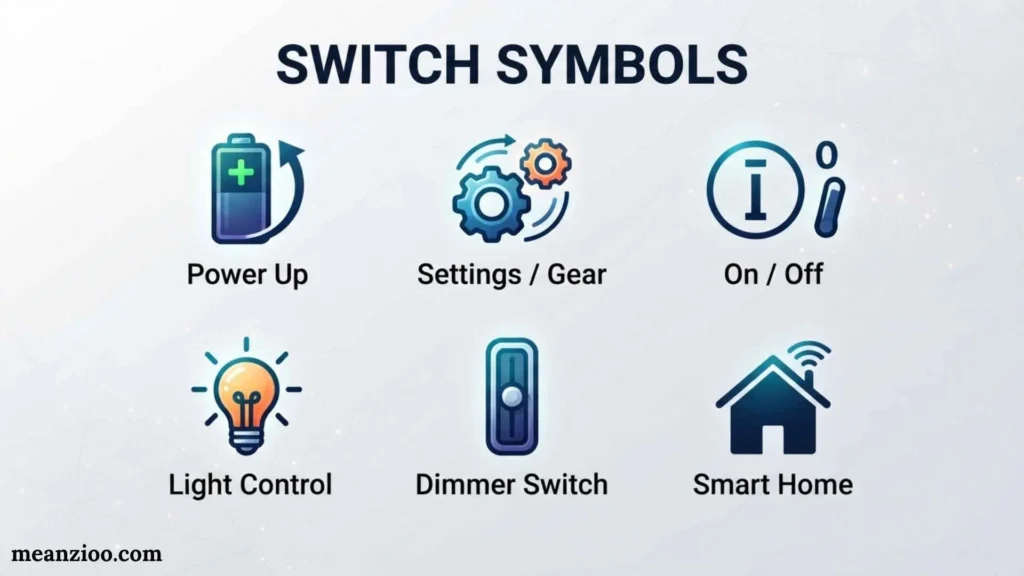
Switch symbols show devices that open or close an electrical path.
Open Switch
An open switch indicates an interrupted circuit path.
Closed Switch
A closed switch indicates a connected circuit path.
Push-Button Switch
A push-button symbol represents a switch operated by pressing a button.
Push buttons are common in:
- Control panels
- Keypads
- Doorbells
- Reset circuits
- Electronic controls
Relay Symbol
A relay is an electrically operated switch.
Its schematic representation generally includes a coil and one or more contacts.
The coil receives an electrical signal and causes the contacts to change state.
Relays are used in:
- Automotive systems
- Industrial automation
- Motor control
- Electrical protection
- Control systems
Transformer Symbol
A transformer transfers electrical energy between circuits through electromagnetic induction.
Its symbol generally contains two coils with parallel lines between them representing the magnetic core.
Transformers are used for:
- Voltage conversion
- Electrical isolation
- Signal coupling
- Impedance matching
- Power supplies
Fuse Symbol
A fuse is a protection device designed to interrupt a circuit when excessive current causes the fuse element to operate.
The fuse is normally placed in series with the circuit it protects.
Fuses are used in:
- Appliances
- Automotive circuits
- Power supplies
- Electronic equipment
- Electrical systems
Sensor Symbols
Electronic schematics can contain many types of sensors.
Common examples include:
Thermistor
A thermistor is a resistor whose resistance changes with temperature.
It can be used for:
- Temperature sensing
- Temperature compensation
- Protection
- Measurement
LDR
An LDR, or light-dependent resistor, changes resistance according to the amount of light falling on it.
It is commonly used in:
- Automatic lights
- Light sensors
- Security systems
- Brightness controls
Photodiode
A photodiode converts incident light into an electrical response.
It is used in:
- Optical communication
- Light detection
- Measurement systems
- Remote-control receivers
Integrated Circuit Symbols
An integrated circuit, or IC, contains many electronic elements within a semiconductor package.
In a schematic, an IC is often represented by a rectangle with multiple pins.
Pins may represent:
- Power
- Ground
- Inputs
- Outputs
- Clock
- Control signals
- Communication lines
Common IC categories include:
- Microcontrollers
- Operational amplifiers
- Timers
- Memory devices
- Logic gates
- Voltage regulators
The exact symbol depends on the specific IC and schematic library.
Logic Gate Symbols
Logic gates are fundamental building blocks of digital electronics.
AND Gate
An AND gate produces a high output when all required inputs are high.
OR Gate
An OR gate produces a high output when one or more inputs are high.
NOT Gate
A NOT gate reverses the input logic state.
NAND Gate
A NAND gate combines AND logic with inversion.
NOR Gate
A NOR gate combines OR logic with inversion.
XOR Gate
An XOR gate produces a high output when its inputs have different logic states.
XNOR Gate
An XNOR gate produces a high output when its inputs have the same logic state.
Logic-gate symbols are especially important when reading digital circuit diagrams.
Electromechanical Electronic Symbols
Some components contain both electrical and mechanical functions.
Motor Symbol
A motor converts electrical energy into mechanical motion.
It is commonly shown as a circle containing M.
Motors are used in:
- Fans
- Pumps
- Robotics
- Machines
- Automotive systems
Speaker Symbol
A speaker converts an electrical signal into sound.
Its symbol usually resembles a speaker cone.
Microphone Symbol
A microphone converts sound into an electrical signal.
It is commonly found in audio and communication schematics.
Antenna Symbol
An antenna represents a device that transmits or receives electromagnetic signals.
Antenna symbols are found in:
- Radio circuits
- Wi-Fi devices
- Bluetooth systems
- Television systems
- Cellular equipment
Electronic Symbols Chart
| Symbol/Component | Function | Key Identification |
| Resistor | Limits current | R |
| Variable resistor | Adjustable resistance | Potentiometer/rheostat |
| Capacitor | Stores electrical charge | C |
| Inductor | Stores magnetic energy | L |
| Diode | Controls current direction | D |
| LED | Emits light | D/LED |
| Zener diode | Voltage regulation | Zener marking |
| BJT | Switching/amplification | Q |
| MOSFET | Electronic switching | Q |
| Battery | DC power source | B/BT |
| Fuse | Overcurrent protection | F |
| Switch | Opens/closes circuit | SW |
| Relay | Electrically operated switch | K |
| Transformer | Transfers AC energy | T |
| Motor | Produces motion | M |
| Speaker | Produces sound | SP |
| IC | Integrated electronic function | U |
| Inductor | Filtering/energy storage | L |
| Sensor | Detects physical conditions | Depends on device |
| Antenna | Sends/receives signals | ANT |
Electronic Component Reference Designators
Reference designators are short labels used to identify individual components in a schematic.
Common examples include:
- R1, R2 — resistors
- C1, C2 — capacitors
- L1, L2 — inductors
- D1, D2 — diodes
- Q1, Q2 — transistors
- U1, U2 — integrated circuits
- SW1 — switch
- F1 — fuse
- T1 — transformer
- K1 — relay
- J1 — connector
The exact designator conventions can vary between projects and standards, but these labels are common in electronic schematics.
Electronic Symbols and Their Terminals
Knowing the terminal names is just as important as recognizing the symbol.
Resistor
A standard resistor is non-polarized, so either end can normally be connected in either direction.
Diode
A diode has:
- Anode
- Cathode
The cathode is identified by the marked line on the physical component and by the corresponding line in the schematic symbol.
LED
An LED also has:
- Anode
- Cathode
Correct polarity is important for normal operation.
BJT
A BJT has:
- Base
- Collector
- Emitter
MOSFET
A MOSFET commonly has:
- Gate
- Drain
- Source
Some MOSFET packages and applications also involve a body or substrate connection.
Capacitor
A non-polarized capacitor can normally be connected in either direction. A polarized capacitor requires attention to positive and negative terminals.
IEC vs. ANSI Electronic Symbols
Electronic symbols can vary according to the standard or convention used.
One well-known difference is the resistor symbol:
- ANSI-style: commonly uses a zigzag line
- IEC-style: commonly uses a rectangular box
This does not mean that the underlying component is different. Both symbols can represent a resistor.
Other symbols may also vary between standards or schematic libraries.
When working with a professional schematic, check which standard or library the drawing follows.
How to Read Electronic Symbols in a Circuit Diagram
Reading a schematic becomes easier if you follow a consistent process.
Step 1: Find the Power Source
Locate the battery, supply rail, AC source, or other power input.
Step 2: Find Ground or the Reference Node
Identify the ground or reference symbol used by the circuit.
Step 3: Follow the Connections
Trace wires from the source through the circuit.
Step 4: Identify Each Symbol
Determine whether each symbol represents a resistor, capacitor, diode, transistor, IC, switch, or another component.
Step 5: Read Reference Labels
Labels such as R1, C1, D1, and U1 tell you which specific component you are looking at.
Step 6: Check Values
Look for values such as:
- 1 kΩ
- 10 µF
- 100 nF
- 5 V
- 2 A
Step 7: Check Polarity and Orientation
Pay particular attention to diodes, LEDs, polarized capacitors, batteries, transistors, and integrated circuits.
How Electronic Symbols Help With Troubleshooting
Electronic symbols are valuable when diagnosing a circuit problem.
Suppose a device does not turn on. A technician can use the schematic to trace the electrical path from the power source to the load.
The technician may check:
- Power source
- Fuse
- Switch
- Resistors
- Diodes
- Transistors
- Integrated circuits
- Ground connections
- Output device
The schematic provides a logical map of the circuit, making it easier to identify where a signal or supply voltage may be missing.
Electronic Symbols vs. Physical Components
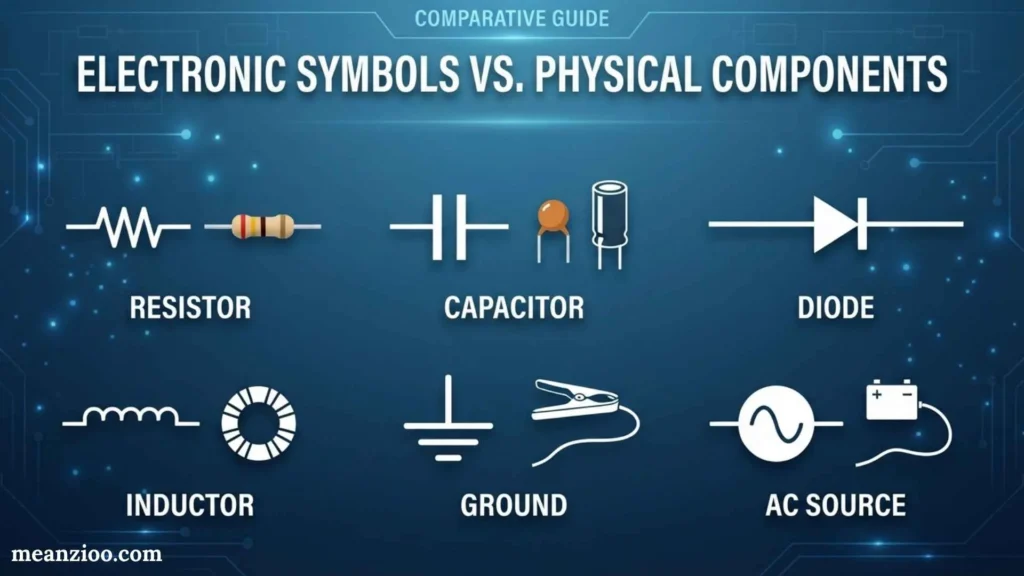
An electronic symbol is not a physical picture of a component.
For example:
- A resistor symbol shows resistance.
- A capacitor symbol shows capacitance.
- A diode symbol shows its electrical direction.
- A transistor symbol shows its terminals and type.
- An IC symbol shows its electrical pins and functions.
The physical component may look completely different.
This is why learning the electrical meaning of symbols is more useful than trying to memorize what a component physically looks like.
Electronic Symbols in Schematic Software
Electronic design software uses symbol libraries to create circuit diagrams.
A typical workflow may include:
- Selecting a component
- Placing its schematic symbol
- Connecting wires
- Adding values
- Assigning reference designators
- Assigning PCB footprints
- Checking electrical connections
- Preparing the design for PCB layout
A schematic symbol and a PCB footprint are not the same thing.
The symbol describes the component electrically, while the footprint describes how the physical component will be mounted on a printed circuit board.
Common Mistakes When Reading Electronic Symbols
Confusing Symbols With Physical Parts
A symbol is a simplified representation, not necessarily a realistic drawing.
Ignoring Polarity
Always check polarity for components that require it.
Assuming Crossing Wires Are Connected
A crossing does not necessarily mean an electrical connection. Check the junction convention used in the schematic.
Ignoring Reference Designators
R1 and R2 are not necessarily interchangeable simply because both are resistors. Their values and circuit positions may be different.
Assuming Every Symbol Is Identical
Different standards and schematic libraries can use different representations.
Focusing Only on Component Names
The connections between components are just as important as the symbols themselves. A circuit’s behavior depends on how those components are connected.
Frequently Asked Questions About Electronic Symbols
What are electronic symbols used for?
Electronic symbols are used to represent components and electrical functions in schematic diagrams. They make circuits easier to design, read, explain, and troubleshoot.
What is the difference between electrical symbols and electronic symbols?
The terms are often used interchangeably. Electrical symbols may cover broader electrical equipment and systems, while electronic symbols are frequently used for components found in electronic circuits.
What is the most common electronic symbol?
There is no single most common symbol for every application. Resistors, capacitors, diodes, transistors, switches, power sources, and ground symbols are among the symbols frequently encountered in electronic schematics.
What does R1 mean in a circuit?
R1 is commonly a reference designator identifying the first resistor in a schematic. The exact naming convention can vary by design.
What does C1 mean?
C1 commonly identifies the first capacitor in a circuit diagram.
What does D1 mean?
D1 commonly identifies the first diode or diode-type component in a schematic.
What does Q1 mean?
Q1 commonly identifies a transistor, although reference designator conventions can vary between schematic standards and design environments.
What does U1 mean?
U1 commonly identifies an integrated circuit or another multi-pin electronic device.
Are electronic symbols standardized?
Many electronic symbols are standardized, but different standards and conventions can produce visual differences. IEC and ANSI conventions are examples of standards that may use different representations for some components.
How can I learn electronic symbols quickly?
Start with common components such as resistors, capacitors, inductors, diodes, LEDs, transistors, switches, batteries, and ground. Then practice reading simple schematics and gradually move to more complex circuits.
Final Thoughts
Understanding electronic symbols gives you a foundation for reading and creating circuit diagrams. These symbols provide a simple visual language for components such as resistors, capacitors, diodes, transistors, sensors, switches, relays, integrated circuits, and power sources.
The best way to learn is through practice. Begin with common symbols, learn their functions and terminals, understand reference designators, and then trace simple circuits from the power source through each component. As you become familiar with different schematic standards and symbol variations, more advanced electronic diagrams will become easier to understand.

Hi, I’m Charlotte Hayes. I love writing about the newest English slang, pop culture phrases, and digital communication. I spend my time exploring how language evolves across social media, gaming, and everyday conversations. I enjoy sharing easy-to-understand guides that help learners keep up with modern English. My goal is to make every article useful, accurate, and enjoyable for readers around the world.
Books:
- Everyday Slang Dictionary
- Fluent Through Informal English
 Ryan Mitchell