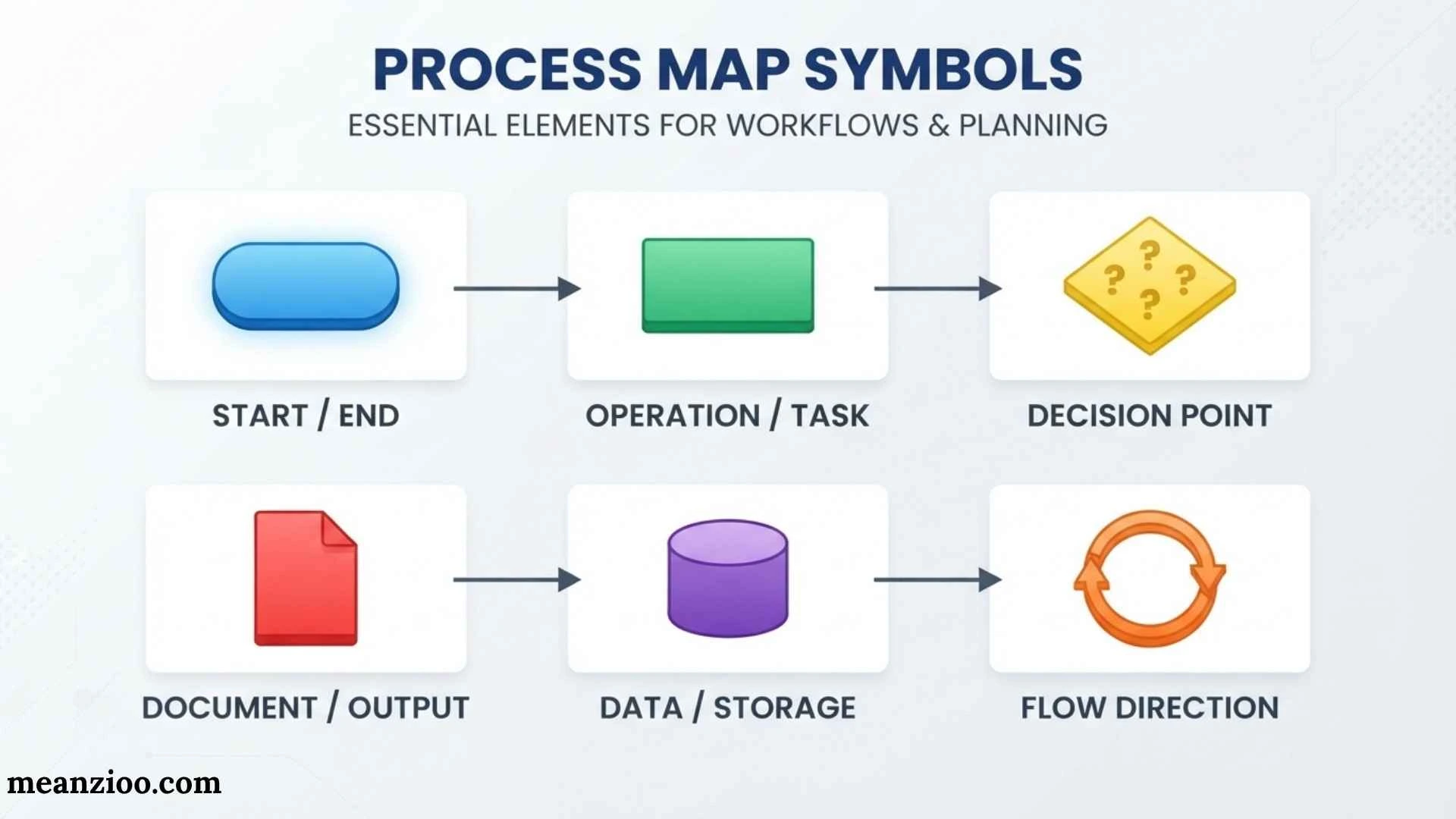
Process map symbols are visual shapes used to represent tasks, decisions, inputs, outputs, documents, data, delays, and other parts of a workflow. They help people understand how a process works without reading a long written procedure.
The most common symbols include the oval for start or end, rectangle for a process or task, diamond for a decision, arrow for process flow, and parallelogram for input or output. Other symbols can represent documents, databases, delays, subprocesses, connectors, and manual input.
Because different diagramming systems can use slightly different conventions, it is important to understand both the common symbols and the notation system being used. This guide explains the most useful process map symbols, their meanings, examples, differences from flowcharts and BPMN, and practical tips for creating clear process maps.
What Are Process Map Symbols?
Process map symbols are standardized or commonly recognized visual shapes that describe different elements of a process.
Instead of writing:
A customer submits an order, an employee checks inventory, payment is reviewed, and the order is either approved or rejected.
A process map can show the same workflow visually:
Start → Receive Order → Check Inventory → Payment Approved? → Process Order → End
Each part is represented by a specific symbol.
Process maps are commonly used in business operations, manufacturing, healthcare, customer service, software development, logistics, quality management, administration, and project management.
One important point is that there is not one universal symbol set for every type of process diagram. Traditional flowcharts have widely recognized conventions, while BPMN uses a more formal notation system. Organizations may also create internal standards. For that reason, a good process map should use symbols consistently and provide a legend when specialized notation is involved.
Why Are Process Map Symbols Important?
A process can involve dozens of activities, decisions, people, documents, systems, and handoffs. Describing all of these elements in paragraphs can make the workflow difficult to follow.
Symbols turn that information into a visual structure.
They can help you:
- Understand a process quickly
- Identify the sequence of activities
- Locate decision points
- Show inputs and outputs
- Identify documents and records
- Highlight delays and waiting periods
- Show handoffs between people or departments
- Identify stored data
- Explain complicated workflows
- Find unnecessary or repeated steps
- Support process improvement
- Train new employees
- Document standard operating procedures
ASQ describes flowcharts as visual representations of the steps in a process and notes their usefulness for understanding relationships between steps and supporting improvement activities.
Basic Process Map Symbols
Most everyday process maps can be created with a relatively small group of symbols.
| Symbol | Common Shape | Meaning |
| Start/End | Oval or rounded rectangle | Beginning or ending point |
| Process | Rectangle | Task or activity |
| Decision | Diamond | Question or branching condition |
| Flow Line | Arrow | Direction of movement |
| Input/Output | Parallelogram | Data or information entering/leaving |
| Document | Document shape | Form, report, or document |
| Connector | Small circle | Connects separated sections |
| Off-Page Connector | Pentagon-like shape | Continues to another page |
| Delay | D-shaped symbol | Waiting or delay |
| Subprocess | Double-lined rectangle | Defined group of activities |
| Data Storage | Database/storage shape | Stored information |
| Manual Input | Slanted-top shape | Information entered manually |
Start and End Symbol
The start/end symbol, also called a terminator, is usually shown as an oval or rounded rectangle.
It tells the reader where the process begins and where it ends.
For example:
Start → Receive Application → Review Application → Approve Application → End
The start and end points establish the boundaries of the process.
A process can have multiple ending points. For example, an application workflow might end with either Application Approved or Application Rejected.
Best Practice for Start and End Symbols
Use clear labels such as:
- Start
- Begin Order Process
- Request Received
- Process Complete
- Order Completed
- End
Avoid vague labels that make it difficult to understand what event starts or finishes the workflow.
Process Symbol
The process symbol is normally a rectangle.
It represents an activity, operation, task, or action performed during the process.
Examples include:
- Review Application
- Check Inventory
- Approve Request
- Create Invoice
- Package Product
- Send Email
- Update Customer Record
The rectangle is one of the most important process map symbols because most workflows contain many activities.
How to Write Inside a Process Symbol
Keep the wording short and action-oriented.
Better:
Review Customer Request
Less effective:
The employee reviews the customer request and checks all information before deciding what to do next.
Detailed instructions can be placed in a procedure document instead of filling the process map with paragraphs.
Decision Symbol
The decision symbol is a diamond.
It represents a question, condition, or decision that changes the path of the workflow.
For example:
Payment Approved?
The diamond could have two outgoing paths:
- Yes → Prepare Order
- No → Contact Customer
Decision symbols are especially useful in:
- Approval processes
- Quality checks
- Troubleshooting
- Insurance claims
- Hiring workflows
- Customer service
- Manufacturing
- Software processes
- Financial procedures
How to Label Decision Symbols
A decision should normally be written as a clear question or condition.
Examples:
- Payment Approved?
- Documents Complete?
- Product Available?
- Customer Eligible?
- Quality Passed?
- Request Valid?
Label the outgoing arrows so readers know what each branch means.
Flow Line or Arrow Symbol
An arrow shows the direction of movement through the process.
For example:
Start → Receive Request → Review Request → Approve?
The arrows tell the reader what happens next.
A process map becomes difficult to understand when arrows cross unnecessarily or move in inconsistent directions.
For most simple workflows, choose one primary direction:
- Top to bottom, or
- Left to right
Then use that direction consistently.
Input and Output Symbol
The input/output symbol is commonly represented by a parallelogram.
It represents information or material entering or leaving a process.
Examples include:
- Customer information
- Payment information
- Order data
- Completed form
- Report output
- System-generated result
For example:
Start → Enter Customer Information → Validate Information → End
The input/output symbol is particularly useful when a process depends on information provided by an outside person or system.
Document Symbol
A document symbol commonly looks like a rectangle with a curved or wavy lower edge.
It represents a document, form, report, receipt, or similar record.
Examples include:
- Invoice
- Application
- Inspection Report
- Receipt
- Contract
- Purchase Order
- Delivery Note
For example:
Complete Order → Generate Invoice → Send Invoice
The document symbol helps distinguish an actual document from an ordinary process activity.
Connector Symbol
A connector is commonly represented by a small circle.
It is useful when a process map becomes large and connecting every section with long arrows would make the diagram messy.
For example, a connector labeled A can indicate that the workflow continues at another location marked A.
Connectors are especially helpful when:
- A diagram contains many branches
- Arrows would cross
- A workflow needs to connect distant sections
- A process must remain on one page
Off-Page Connector Symbol
An off-page connector indicates that the process continues on another page or diagram.
This is useful for very large processes.
For example:
Verify Documents → [Continue on Page 2]
The reader can then find the matching connector on the next page.
This approach is generally cleaner than drawing extremely long arrows across multiple pages.
Delay Symbol
The delay symbol represents waiting or a pause in the process.
It is often represented by a D-shaped or semicircular form, although exact conventions can vary.
Examples include:
- Waiting for approval
- Waiting for customer information
- Waiting for materials
- Waiting for an appointment
- Waiting for system processing
Delays are important because a process can contain very little actual work but still take a long time because of waiting.
For process improvement, identifying these waiting points can reveal potential bottlenecks.
Subprocess Symbol
A subprocess symbol represents a group of activities that is defined separately.
It is commonly shown as a rectangle with double vertical lines.
For example, instead of putting every account-verification step into a large workflow, a process map might simply show:
Verify Customer Account
That subprocess can have its own detailed process map.
This approach is useful when:
- A workflow is complex
- A repeated procedure appears several times
- A high-level map is needed
- Different teams need separate detailed procedures
Data Storage Symbol
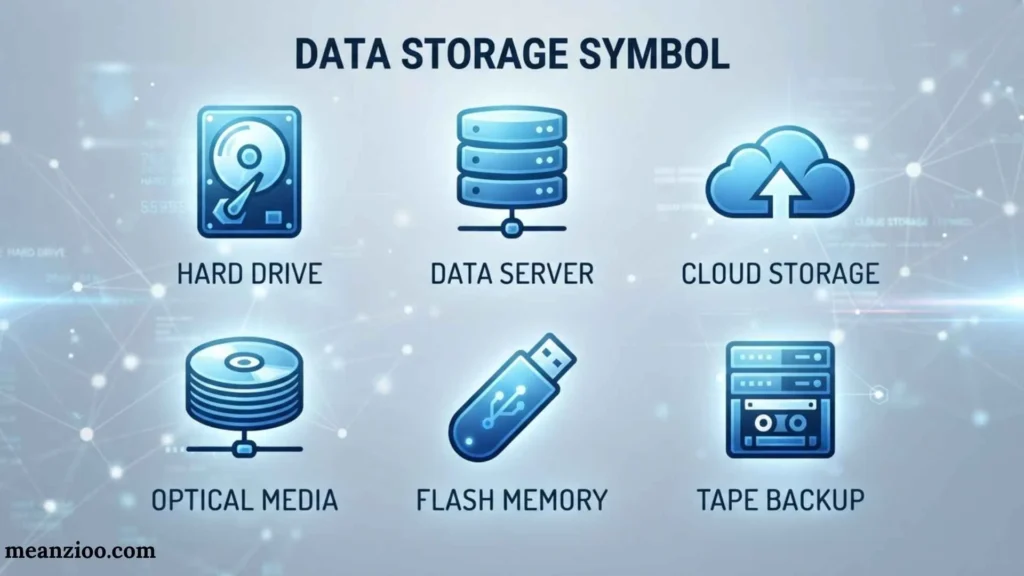
A data storage symbol represents information saved for later use.
Examples include:
- Customer database
- Employee records
- Inventory database
- Document archive
- Order management system
A simple workflow could be:
Enter Customer Data → Validate Data → Save to Customer Database
The storage symbol makes it clear that information is not merely being processed—it is being retained.
Manual Input Symbol
A manual input symbol represents information entered directly by a person.
For example:
Customer → Enter Contact Details → System Saves Information
This can be useful when analyzing the difference between automated and manual activities.
Manual input is often important in process improvement because it can help identify:
- Repetitive work
- Data-entry errors
- Duplicate entry
- Automation opportunities
- Unnecessary human intervention
Process Map Symbols for Swimlane Diagrams
A swimlane process map adds another layer to a normal process map by showing who is responsible for each step.
The lanes can represent:
- Employees
- Departments
- Teams
- Customers
- Suppliers
- Software systems
For example:
| Customer | Sales Team | Warehouse |
| Submit Order | Review Order | Check Inventory |
| Receive Confirmation | Process Payment | Prepare Package |
The normal process symbols still represent activities and decisions, while the swimlanes show who performs them.
This is particularly useful when a process involves many handoffs between departments.
Process Map Symbols in Different Industries
Process maps are not limited to one type of business.
Manufacturing
A manufacturing process may include:
Receive Materials → Inspect Materials → Materials Approved? → Assemble Product → Quality Check → Package Product
Symbols can show inspections, decisions, production steps, delays, and inventory.
Healthcare
A healthcare workflow might include:
Patient Arrives → Register Patient → Verify Information → Appointment Available? → See Provider → Update Record
The map can show documents, patient information, decisions, and system records.
Customer Service
A customer service process could be:
Customer Contacts Support → Identify Issue → Can Issue Be Resolved?
If yes:
→ Provide Solution → Close Ticket
If no:
→ Escalate Ticket → Specialist Review → Close Ticket
Software and IT
An IT workflow might include:
Receive Ticket → Categorize Issue → Is Issue Critical? → Assign Technician → Resolve Issue → Close Ticket
Data storage symbols can represent ticketing systems or databases.
Human Resources
An employee onboarding process might be:
Offer Accepted → Collect Documents → Documents Complete? → Create Employee Account → Schedule Orientation → Complete Onboarding
The decision symbol makes missing information or incomplete documentation visible.
Process Map Symbols vs. Flowchart Symbols
The terms process map symbols and flowchart symbols are closely related.
A flowchart is a general visual representation of steps, decisions, and sequences. A process map typically focuses on how a real-world business or operational process works.
| Process Map | Flowchart |
| Often focuses on business processes | Can represent many kinds of logic |
| May show people and departments | Often focuses on sequence and decisions |
| Can include handoffs and delays | Commonly emphasizes logical flow |
| Used for process improvement | Used for processes, algorithms, troubleshooting, and more |
| Can use swimlanes | May or may not use swimlanes |
There is significant overlap between the two. In many everyday contexts, a process map can use traditional flowchart notation.
Process Map vs. Workflow Diagram
A workflow diagram shows how work moves from one activity to another.
A process map can do the same thing but may provide broader context, such as:
- Inputs
- Outputs
- Roles
- Systems
- Documents
- Delays
- Measurements
- Handoffs
The terminology is not always used consistently, so the actual structure of the diagram matters more than the label.
Process Map vs. BPMN
BPMN, or Business Process Model and Notation, is a formal standard designed specifically for business process modeling.
Traditional process maps commonly use simple symbols such as rectangles and diamonds. BPMN provides more specialized elements, including:
- Events
- Tasks
- Gateways
- Pools
- Lanes
- Message flows
- Sequence flows
This makes BPMN useful for complex processes involving organizations, systems, events, and interactions.
For a simple employee or customer workflow, traditional process mapping may be easier for a general audience. For complex business process modeling, BPMN can provide more formal structure.
The important point is that BPMN symbols should not be casually treated as identical to traditional flowchart symbols.
Process Map Symbols PDF and Cheat Sheet
A quick-reference sheet can make process map symbols easier to remember.
Basic Cheat Sheet
Oval → Start or End
Rectangle → Process or Task
Diamond → Decision
Arrow → Flow Direction
Parallelogram → Input or Output
Document Shape → Document or Report
Circle → Connector
Off-Page Connector → Continue on Another Page
D-Shape → Delay
Double-Line Rectangle → Subprocess
Database/Storage Shape → Stored Data
Manual Input Shape → Manual Data Entry
When creating a printable PDF or internal company guide, include the symbol, its name, its meaning, and one short example.
What Does a Circle Mean in a Process Map?
A circle commonly represents a connector.
It allows two separated parts of the same process to connect without drawing a long or crossing arrow.
However, symbol meanings can vary depending on the notation system, so a legend should be used when there is any possibility of confusion.
What Does a Rectangle Mean in a Process Map?
A rectangle usually represents a process, activity, task, or operation.
Examples include:
- Review Application
- Check Inventory
- Send Email
- Approve Payment
- Update Record
It is one of the most frequently used symbols in traditional process maps and flowcharts.
What Does a Diamond Mean in a Process Map?
A diamond represents a decision point.
It normally contains a question or condition and creates two or more possible paths.
For example:
Is Payment Approved?
The paths could be:
Yes → Ship Order
No → Contact Customer
What Does a Parallelogram Mean in a Process Map?
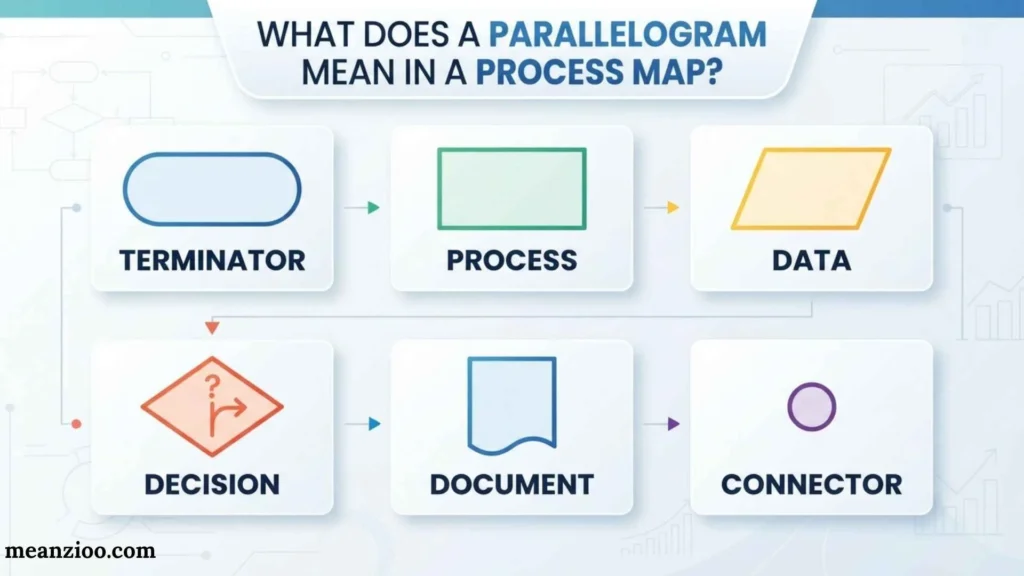
A parallelogram commonly represents input or output.
It can show information entering a system or information being produced by a process.
Examples include entering customer information or generating a report.
What Does a D-Shaped Symbol Mean in a Process Map?
A D-shaped or semicircular symbol can represent a delay or waiting period in traditional process mapping conventions.
For example:
Submit Application → Wait for Approval → Review Application
The delay symbol makes the waiting period visible instead of hiding it between two activities.
How to Create a Process Map Using the Right Symbols
Creating a useful process map does not require starting with dozens of shapes.
Define the Process
First decide exactly what process you are mapping.
For example:
Customer Order Fulfillment
Identify the Starting Event
Determine what triggers the process.
Example:
Customer Places Order
List the Main Activities
Write down the major actions in order.
Example:
- Receive Order
- Check Inventory
- Process Payment
- Prepare Order
- Ship Order
Identify Decisions
Look for questions that can change the workflow.
Examples:
- Is inventory available?
- Is payment approved?
- Is the document complete?
Identify Inputs and Outputs
Determine what information or materials enter and leave the process.
Identify Documents and Data
Add invoices, forms, reports, databases, and other records where appropriate.
Add Responsibilities
If several people or departments participate, use swimlanes to make ownership clear.
Connect the Symbols
Use arrows to show the flow.
Review the Map
Ask:
- Can someone unfamiliar with the process understand it?
- Are all decision paths labeled?
- Are important delays visible?
- Are responsibilities clear?
- Are unnecessary steps present?
- Are there too many crossing lines?
Common Mistakes With Process Map Symbols
Using Symbols Without a Consistent Meaning
If a rectangle means “task” in one section but “document” in another, the diagram becomes confusing.
Unlabeled Decision Paths
A diamond with multiple arrows should clearly indicate what each path represents.
Too Much Text
A process map should communicate the workflow visually. Long paragraphs inside shapes reduce readability.
Too Many Crossed Lines
Use connectors or reorganize the layout to reduce unnecessary crossing arrows.
Mixing Notation Systems
Traditional flowcharts and BPMN are not identical. If you combine conventions, explain them.
Ignoring Waiting Time
Only showing active tasks can hide major bottlenecks.
Mapping Too Much at Once
Trying to place an entire organization into one diagram can make it impossible to read. Create high-level and detailed maps when necessary.
Benefits of Standard Process Map Symbols
Using consistent symbols makes workflows easier to communicate and analyze.
Better Communication
A shared visual language helps employees understand the same process.
Easier Training
New employees can use process maps to learn procedures.
Improved Documentation
A visual workflow can complement written policies and standard operating procedures.
Easier Problem Identification
Bottlenecks, repeated steps, unnecessary approvals, and delays become easier to spot.
Better Process Improvement
Teams can examine the current workflow before designing a more efficient future state.
Clearer Responsibilities
Swimlane maps can show which team or person handles each activity.
Frequently Asked Questions About Process Map Symbols
What are the most common process map symbols?
The most common symbols are the oval for start/end, rectangle for a process, diamond for a decision, arrow for flow, and parallelogram for input/output. Document, connector, delay, subprocess, and data-storage symbols are also frequently used.
What is the most important symbol in a process map?
There is no single symbol that is always the most important. The rectangle, diamond, and arrow are particularly common because most workflows contain activities, decisions, and movement between steps.
Are process map symbols standardized?
Some traditional flowchart symbols are widely recognized, but there is not one symbol system that applies identically to every process map. BPMN has its own formal notation, and organizations may establish internal conventions.
What is the difference between a process and a decision symbol?
A process symbol represents an action or activity, while a decision symbol represents a question or condition that determines which path the workflow follows.
Can process maps have multiple decision points?
Yes. Complex workflows can contain many decision points. Each decision should have clearly labeled paths so readers understand what happens under each condition.
Can a process map show people or departments?
Yes. Swimlane process maps divide the diagram into lanes representing people, teams, departments, customers, suppliers, or systems.
Why are arrows important in process maps?
Arrows show the direction and sequence of the workflow. They connect symbols and help readers understand what happens next.
What symbol represents a document?
A document is commonly represented by a rectangle with a curved or wavy bottom edge. The exact appearance can vary depending on the notation system.
What symbol represents stored data?
Stored data is commonly represented by a database or data-storage symbol. It can represent a customer database, inventory system, records archive, or another information repository.
Should every process map include every possible symbol?
No. A clear process map should use only the symbols needed to communicate the workflow. Adding unnecessary shapes can make the diagram harder to understand.
Final Thoughts
Process map symbols create a visual language for showing how work moves from one step to another. The core symbols are simple: ovals identify starts and ends, rectangles represent activities, diamonds show decisions, arrows indicate flow, and parallelograms represent inputs or outputs.
More specialized symbols can show documents, connectors, delays, subprocesses, stored data, and manual input. Swimlanes can add information about who performs each activity, while BPMN provides a more formal notation for complex business processes.
The most effective process map is not necessarily the one with the most symbols. It is the one that makes the workflow clear, accurate, consistent, and easy to follow. Use a logical flow direction, short action labels, clearly marked decision paths, appropriate symbols, and a legend whenever specialized notation could cause confusion.
With these principles, process map symbols can turn complicated workflows into practical visual guides that support communication, training, documentation, and continuous process improvement.

Hi, I’m Charlotte Hayes. I love writing about the newest English slang, pop culture phrases, and digital communication. I spend my time exploring how language evolves across social media, gaming, and everyday conversations. I enjoy sharing easy-to-understand guides that help learners keep up with modern English. My goal is to make every article useful, accurate, and enjoyable for readers around the world.
Books:
- Everyday Slang Dictionary
- Fluent Through Informal English
 Ryan Mitchell